cancel
Showing results for 
Search instead for 
Did you mean: 

Learn from the best! Meet the four finalists headed to the FINALS of the Power BI Dataviz World Championships! Register now

Reply
TomStaps
Helper I
Helper I

Visualize Average Calculation

Hi all,


A colleague of my made a great survey. She did already a great job visualizing it. But we have one problem.


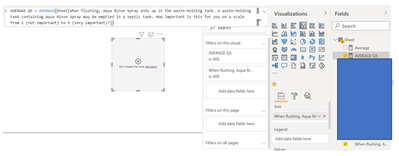
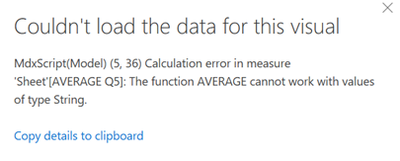
We calculated the average of a question in Power BI by making a new measure. It is linked to a question where people were able to choose a score between 1 and 5. Now we need to visualize it. We were not able to do this. The second picture shows the notification Power BI gives us. We do not know what it means and how to solves is. Do one of you know how to visualize the new measure we made? 


Hope one of you know the solution. We appreciate your help. Thank you in advance.

TomStaps_0-1636121256709.png

TomStaps_1-1636121370820.png

Best Regards,

Tom

1 ACCEPTED SOLUTION
TomMartens
Super User
Super User

Hey @TomStaps ,


The error message tells you that the column you want to average is of the data type text. You have to change the data type of the column: Data types in Power BI Desktop - Power BI | Microsoft Docs


Hopefully, this gets you started.


Regards,

Tom


Did I answer your question? Mark my post as a solution, this will help others!

Proud to be a Super User!
I accept Kudos 😉
Hamburg, Germany

View solution in original post

2 REPLIES 2
TomMartens
Super User
Super User

Hey @TomStaps ,


The error message tells you that the column you want to average is of the data type text. You have to change the data type of the column: Data types in Power BI Desktop - Power BI | Microsoft Docs


Hopefully, this gets you started.


Regards,

Tom


Did I answer your question? Mark my post as a solution, this will help others!

Proud to be a Super User!
I accept Kudos 😉
Hamburg, Germany

Thank you for the help!


Helpful resources

Announcements
Join our Fabric User Panel

Join our Fabric User Panel

Share feedback directly with Fabric product managers, participate in targeted research studies and influence the Fabric roadmap.

February Power BI Update Carousel

Power BI Monthly Update - February 2026

Check out the February 2026 Power BI update to learn about new features.

FabCon Atlanta 2026 carousel

FabCon Atlanta 2026

Join us at FabCon Atlanta, March 16-20, for the ultimate Fabric, Power BI, AI and SQL community-led event. Save $200 with code FABCOMM.