Don't miss your chance to take the Fabric Data Engineer (DP-700) exam on us!
Learn moreNext up in the FabCon + SQLCon recap series: The roadmap for Microsoft SQL and Maximizing Developer experiences in Fabric. All sessions are available on-demand after the live show. Register now
Hi all,
A colleague of my made a great survey. She did already a great job visualizing it. But we have one problem.
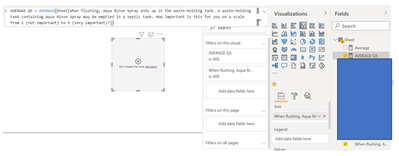
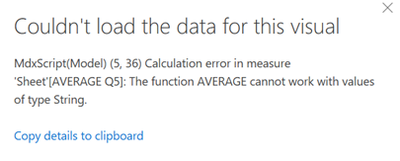
We calculated the average of a question in Power BI by making a new measure. It is linked to a question where people were able to choose a score between 1 and 5. Now we need to visualize it. We were not able to do this. The second picture shows the notification Power BI gives us. We do not know what it means and how to solves is. Do one of you know how to visualize the new measure we made?
Hope one of you know the solution. We appreciate your help. Thank you in advance.
Best Regards,
Tom
Solved! Go to Solution.
Hey @TomStaps ,
The error message tells you that the column you want to average is of the data type text. You have to change the data type of the column: Data types in Power BI Desktop - Power BI | Microsoft Docs
Hopefully, this gets you started.
Regards,
Tom
Hey @TomStaps ,
The error message tells you that the column you want to average is of the data type text. You have to change the data type of the column: Data types in Power BI Desktop - Power BI | Microsoft Docs
Hopefully, this gets you started.
Regards,
Tom
Thank you for the help!
If you have recently started exploring Fabric, we'd love to hear how it's going. Your feedback can help with product improvements.
A new Power BI DataViz World Championship is coming this June! Don't miss out on submitting your entry.
Share feedback directly with Fabric product managers, participate in targeted research studies and influence the Fabric roadmap.