This time we’re going bigger than ever. Fabric, Power BI, SQL, AI and more. We're covering it all. You won't want to miss it.
Learn moreLevel up your Power BI skills this month - build one visual each week and tell better stories with data! Get started
Good day Community,
I have prbably simple question. I have data which looks like that. Data comes from similar Excel files from different assessments:
ITEM 1 ITEM 2 ITEM 2
Manager GOOD BAD NOT ASSESSED
Operator NOT ASSESSED VERY GOOD BAD
Assistant GOOD AVERAGE NOT ASSESSED
In a background of Excel, I have chaged asessemnt crtieria to NUMBERS to allow better visualization for AREA CHARTS etc... Text can only be presented by PIE CHARTS in %.
GOOD is 5
AVERAGE is 3
NOT ASSESED is 0
Question #1: In need average mark for every item, how to exclude 0 mark from average. I do not want to hide 0 as I want to know how many times "NOT ASSESSED" was used.
Question#2: On are chart, It will preferlty show what I need if I use numbers - Can I change legend and labels in Power Bi to customize numbers back to TEXT for better understanding of reader?
Thnaks
Aleks
Solved! Go to Solution.
@AleksandrMe
For Q2, you may create another column as the labels, something like:
Column 2 = SWITCH(TRUE(),[Measure]<3,"Don't Meet Standard",[Measure]>=3,"Meet Standard")
Paul Zheng _ Community Support Team
If this post helps, then please consider Accept it as the solution to help the other members find it more quickly.
@AleksandrMe - I would unpivot those last three columns (ITEM1, ITEM2, ITEM3) in Power Query. You could get the average of no 0's by doing something like:
You could create a column then like this:
Column = SWITCH([Value],"GOOD",5,"AVERAGE",3,"NOT ASSESSED",0)
Then a measure like this:
Measure = AVERAGEX(FILTER('Table',[Column]<>0),[Column])
@Greg_Deckler - Thanks Greg.
I figured out how to deal with average exlusion of ) values. However still not able to figure out if my another idea is possible at all.
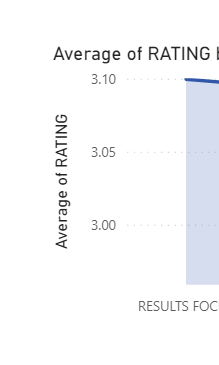
Please see screen - TO have this graph I need Numbers but Not Text. I woul like to keep this type of graph by I woul like to use text for labels - this is where I struggle. Reader needs to undertand what 3.0 means, this for example "Meet Standard" etc...
@AleksandrMe
For Q2, you may create another column as the labels, something like:
Column 2 = SWITCH(TRUE(),[Measure]<3,"Don't Meet Standard",[Measure]>=3,"Meet Standard")
Paul Zheng _ Community Support Team
If this post helps, then please consider Accept it as the solution to help the other members find it more quickly.
Check out the April 2026 Power BI update to learn about new features.
Sign up to receive a private message when registration opens and key events begin.
If you have recently started exploring Fabric, we'd love to hear how it's going. Your feedback can help with product improvements.
| User | Count |
|---|---|
| 12 | |
| 11 | |
| 8 | |
| 7 | |
| 7 |
| User | Count |
|---|---|
| 35 | |
| 26 | |
| 25 | |
| 23 | |
| 22 |