Get certified for free when you join Fabric Data Days 2026 and dive into Fabric, Power BI, SQL, AI, and other essential data skills.
Join nowJuly 28 - August 9 | Final Round of the Power BI Dataviz World Championships. This is your chance. Learn more
Hello,
I'm trying to manage alerts so that I can watch the inventory of the products of my company.
The purpose of this is to be notify if the stock of a product is under the minimum stock.
For example, if I have 200 coca-cola and the minimum stock is 300, I will receive an alert.
Now the problem here is that I have two columns which contains the actual stock and the minimum stock and I don't know how to make alert based on the difference of the two columns. Each product have his own minimum stock.
For example, you can see the table below :
| Product Code | Actual Stock | Minimum Stock |
| 30000222 | 1000 | 1200 |
| 3002373 | 2000 | 1000 |
Solved! Go to Solution.
Hi @eric98 ,
According to your description, here is my solution.
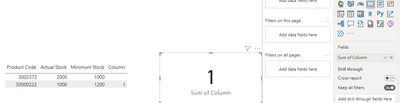
Create a column.
Column =
IF ( 'Table'[Actual Stock] < 'Table'[Minimum Stock], 1, BLANK () )
Put the column into a card.
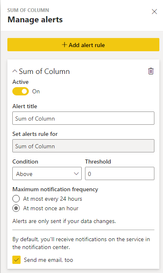
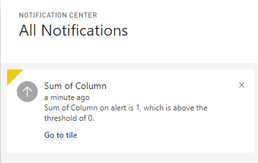
Set to trigger an alarm when the sum of column is greater than 0. And then you will get the notification.
Best Regards,
Community Support Team _ xiaosun
If this post helps, then please consider Accept it as the solution to help the other members find it more quickly.
Hi @eric98 ,
According to your description, here is my solution.
Create a column.
Column =
IF ( 'Table'[Actual Stock] < 'Table'[Minimum Stock], 1, BLANK () )
Put the column into a card.
Set to trigger an alarm when the sum of column is greater than 0. And then you will get the notification.
Best Regards,
Community Support Team _ xiaosun
If this post helps, then please consider Accept it as the solution to help the other members find it more quickly.
Can you create a calculation in your model that subtracts the two fields?
Hello,
Yeah I can do that !
If you love stickers, then you will definitely want to check out our community sticker challenge, Barcelona edition!
Check out the July 2026 Power BI update to learn about new features.
| User | Count |
|---|---|
| 14 | |
| 9 | |
| 9 | |
| 8 | |
| 6 |