cancel
Showing results for 
Search instead for 
Did you mean: 

The Power BI Data Visualization World Championships is back! Get ahead of the game and start preparing now! Learn more

Reply
Anwar-2410
Frequent Visitor

Unable to read data from the transport connection: The connection was closed.

Hi All,

I have a Power BI Report which is of 3GB in size and I am unable to publish it on the Premimum Workspace. I am getting the below error message :-

'An error occurred while attempting to publish <PBI File Name>. Unable to read data from the transport connection: The connection was closed.'

I have data source from SharePoint and SQL. Please help me in resolving the issue.

Thanks

1 ACCEPTED SOLUTION
v-henryk-mstf
Community Support
Community Support

Hi @Anwar-2410 ,


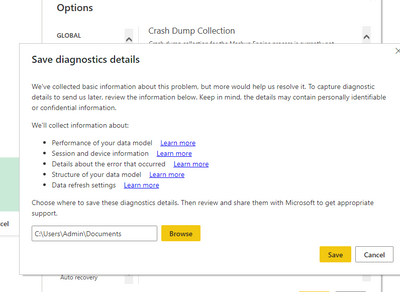
My suggestion: Please try updating your Power BI desktop to the latest one and then publish it again. Also enable trace logging to see detailed error messages.

vhenrykmstf_0-1650422523387.png

Also use the gateway to configure the connection information for SharePoint and SQL data sources.


You can refer to the following similar solutions.

Solved: An error occured while attempting to publish. The ... - Microsoft Power BI Community


If the problem is still not resolved, please provide detailed error information and let me know immediately. Looking forward to your reply.


Best Regards,
Henry


If this post helps, then please consider Accept it as the solution to help the other members find it more quickly.

View solution in original post

2 REPLIES 2
v-henryk-mstf
Community Support
Community Support

Hi @Anwar-2410 ,


My suggestion: Please try updating your Power BI desktop to the latest one and then publish it again. Also enable trace logging to see detailed error messages.

vhenrykmstf_0-1650422523387.png

Also use the gateway to configure the connection information for SharePoint and SQL data sources.


You can refer to the following similar solutions.

Solved: An error occured while attempting to publish. The ... - Microsoft Power BI Community


If the problem is still not resolved, please provide detailed error information and let me know immediately. Looking forward to your reply.


Best Regards,
Henry


If this post helps, then please consider Accept it as the solution to help the other members find it more quickly.

ibarrau
Super User
Super User

Hi. That's weird. If you have a Premium Capacity it should let you upload. I'm not sure why is that, but you can do a sample of data to publish and ask for the whole data once it's in service. How? like the following post:

https://blog.ladataweb.com.ar/post/648999844052189184/powerbidesktop-trabajar-con-millones-de-filas-...

Creating a parameter to reduce rows in Power Bi Desktop, once published just change the parameter in service and refresh. You can also limit that from SQL if you are connecting to a view. Create a TOP X inside the view, publish and then remove it to refresh.

I hope that helps,

P/D If you have published the report try importing from service or the other way around.


If this post helps, then please consider Accept it as the solution to help the other members find it more quickly.

Happy to help!

LaDataWeb Blog

Helpful resources

Announcements
November Power BI Update Carousel

Power BI Monthly Update - November 2025

Check out the November 2025 Power BI update to learn about new features.

Fabric Data Days Carousel

Fabric Data Days

Advance your Data & AI career with 50 days of live learning, contests, hands-on challenges, study groups & certifications and more!

FabCon Atlanta 2026 carousel

FabCon Atlanta 2026

Join us at FabCon Atlanta, March 16-20, for the ultimate Fabric, Power BI, AI and SQL community-led event. Save $200 with code FABCOMM.

Top Solution Authors