

Share feedback directly with Fabric product managers, participate in targeted research studies and influence the Fabric roadmap.
Sign up nowGet Fabric certified for FREE! Don't miss your chance! Learn more
I am having trouble with a the "%" escape character in a field Value. I am confident I have the syntax per the microsoft documentation correct (https://learn.microsoft.com/en-us/power-bi/collaborate-share/service-url-filters), as I can get one escape character to work fine but not the other. Here is the situation:
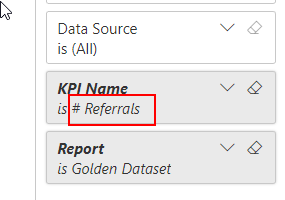
DOESNT WORK: %25 Escape Character doesnt work
WORKS: %23 Escape Character works fine
Solved! Go to Solution.
Hi @jake_BIV ,
This is an known issue , the ID is 343481950 .
Here's a workaround for your reference:
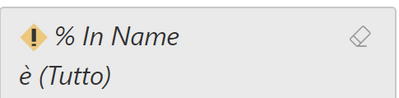
The syntax for escaping special characters is explained in the documentation: "Special characters and spaces in table and column names require more formatting. When your query contains spaces, dashes, or other non-ASCII characters, prefix those special characters with an escape code starting with an underscore and an X (_x), then the four-digit Unicode, then another underscore. If the Unicode is fewer than four characters, you need to pad it with zeroes. Here are some examples." So for example, the percentage (%) sign is _x0025_. Space is _x0020_. Here is an example:
Result:
Best regards,
Yadong Fang
If this post helps, then please consider Accept it as the solution to help the other members find it more quickly.
Hi @jake_BIV ,
This is an known issue , the ID is 343481950 .
Here's a workaround for your reference:
The syntax for escaping special characters is explained in the documentation: "Special characters and spaces in table and column names require more formatting. When your query contains spaces, dashes, or other non-ASCII characters, prefix those special characters with an escape code starting with an underscore and an X (_x), then the four-digit Unicode, then another underscore. If the Unicode is fewer than four characters, you need to pad it with zeroes. Here are some examples." So for example, the percentage (%) sign is _x0025_. Space is _x0020_. Here is an example:
Result:
Best regards,
Yadong Fang
If this post helps, then please consider Accept it as the solution to help the other members find it more quickly.
I submitted a ticket and Microsoft thinks it's a bug.
The same question has been asked last week, without resolution. You can raise an issue at https://issues.powerbi.com . If you have a Pro license you can consider raising a Pro ticket at https://powerbi.microsoft.com/en-us/support/pro/
Share feedback directly with Fabric product managers, participate in targeted research studies and influence the Fabric roadmap.
If you love stickers, then you will definitely want to check out our Community Sticker Challenge!
Check out the January 2026 Power BI update to learn about new features.
| User | Count |
|---|---|
| 19 | |
| 8 | |
| 7 | |
| 7 | |
| 7 |
| User | Count |
|---|---|
| 52 | |
| 46 | |
| 25 | |
| 25 | |
| 24 |