This is best Fabric, Power BI, SQL and AI community event. How do we know? The last event sold out! Save €200 with code FABCMTY200.
Register nowA new Data Days event is coming soon! This time we’re going bigger than ever. Fabric, Power BI, SQL, AI and more. Don't miss out.
Hi All,
Solved! Go to Solution.
Hi @Anonymous ,
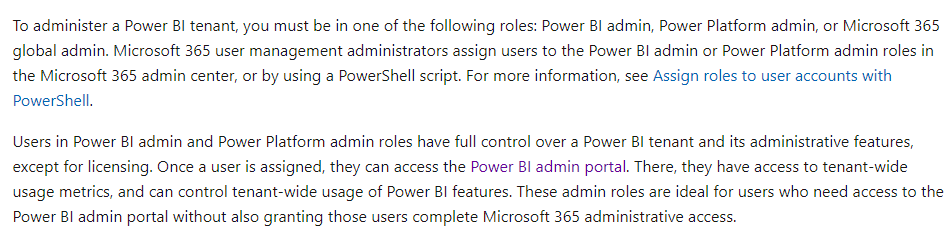
You could reference the two document to learn more.
Tenant Admin
https://docs.microsoft.com/en-us/power-bi/admin/service-admin-role
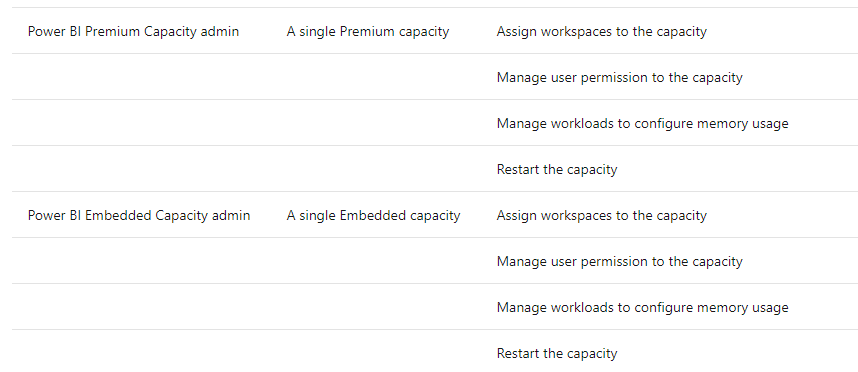
Capacity Admin
Hi @Anonymous ,
You could reference the two document to learn more.
Tenant Admin
https://docs.microsoft.com/en-us/power-bi/admin/service-admin-role
Capacity Admin
Hi @Anonymous ,
According to this document,https://docs.microsoft.com/en-us/power-bi/admin/service-premium-capacity-manage#:~:text=Capacity%20A...
Capacity Admins cannot access workspace content unless explicitly assigned in workspace permissions. They also don't have access to all Power BI admin areas (unless explicitly assigned) such as usage metrics, audit logs, or tenant settings. Importantly, Capacity Admins do not have permissions to create new capacities or scale existing capacities. Admins are assigned on a per capacity basis, ensuring that they can only view and manage capacities to which they are assigned
Proud to be a Datanaut!
Private message me for consulting or training needs.
Check out the May 2026 Power BI update to learn about new features.
Sign up to receive a private message when registration opens and key events begin.
If you have recently started exploring Fabric, we'd love to hear how it's going. Your feedback can help with product improvements.
| User | Count |
|---|---|
| 10 | |
| 8 | |
| 7 | |
| 6 | |
| 6 |
| User | Count |
|---|---|
| 24 | |
| 23 | |
| 21 | |
| 19 | |
| 16 |