Join us at FabCon Atlanta from March 16 - 20, 2026, for the ultimate Fabric, Power BI, AI and SQL community-led event. Save $200 with code FABCOMM.
Register now!The Power BI Data Visualization World Championships is back! Get ahead of the game and start preparing now! Learn more
Hi All,
Solved! Go to Solution.
Hi @Anonymous ,
You could reference the two document to learn more.
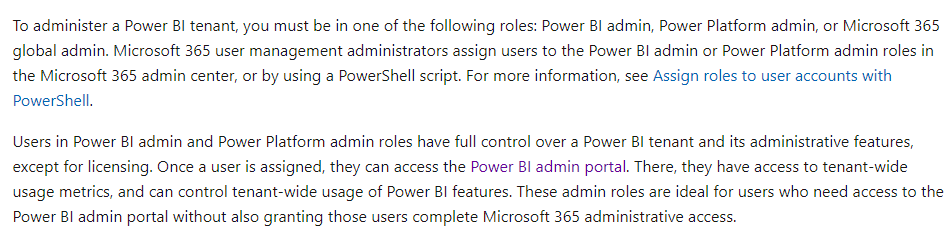
Tenant Admin
https://docs.microsoft.com/en-us/power-bi/admin/service-admin-role
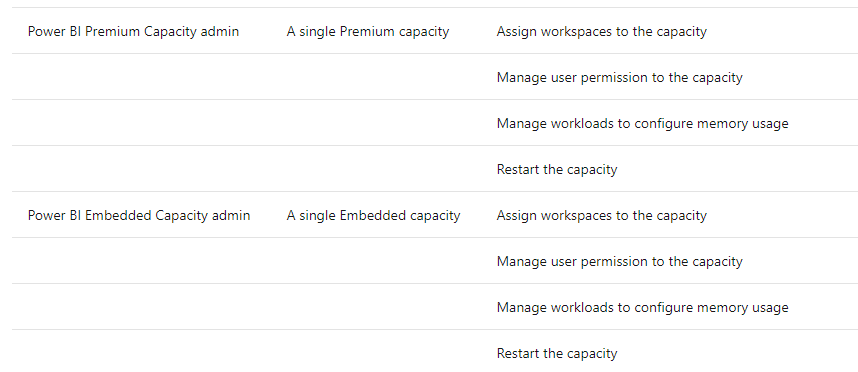
Capacity Admin
Hi @Anonymous ,
You could reference the two document to learn more.
Tenant Admin
https://docs.microsoft.com/en-us/power-bi/admin/service-admin-role
Capacity Admin
Hi @Anonymous ,
According to this document,https://docs.microsoft.com/en-us/power-bi/admin/service-premium-capacity-manage#:~:text=Capacity%20Admins%20cannot%20access%20workspace%20content%20unless%20explicitly,to%20create%20new%20capacities%20or%20scale%20existing%20capacities.
Capacity Admins cannot access workspace content unless explicitly assigned in workspace permissions. They also don't have access to all Power BI admin areas (unless explicitly assigned) such as usage metrics, audit logs, or tenant settings. Importantly, Capacity Admins do not have permissions to create new capacities or scale existing capacities. Admins are assigned on a per capacity basis, ensuring that they can only view and manage capacities to which they are assigned
Proud to be a Datanaut!
Private message me for consulting or training needs.
Check out the November 2025 Power BI update to learn about new features.
Advance your Data & AI career with 50 days of live learning, contests, hands-on challenges, study groups & certifications and more!