This is best Fabric, Power BI, SQL and AI community event. How do we know? The last event sold out! Save €200 with code FABCMTY200.
Register nowJuly 28 - August 9 | Final Round of the Power BI Dataviz World Championships. This is your chance. Learn more
Solved! Go to Solution.
Firstly, it is not possible to prevent users from sharing dashboard from “My Workspace”, a similar thread about this issue has been submitted in this link you can vote it up and add your comments there.
Secondly, currently you can still prevent users from creating app workspace following the instructions in this blog: https://www.kasperonbi.com/disable-power-bi-workspace-or-group-creation-for-certain-users-or-groups/ .
Regards,
Firstly, it is not possible to prevent users from sharing dashboard from “My Workspace”, a similar thread about this issue has been submitted in this link you can vote it up and add your comments there.
Secondly, currently you can still prevent users from creating app workspace following the instructions in this blog: https://www.kasperonbi.com/disable-power-bi-workspace-or-group-creation-for-certain-users-or-groups/ .
Regards,
Hi @emmet63
For question 1, one limitation that you can put in place is for people to not share to others outside their organization.
You can also disable people from sigining up to the Power BI, so even if they did get something shared with them they would not be able to sign in.
https://powerbi.microsoft.com/en-us/blog/ability-to-disable-free-sign-ups-for-the-free-power-bi/
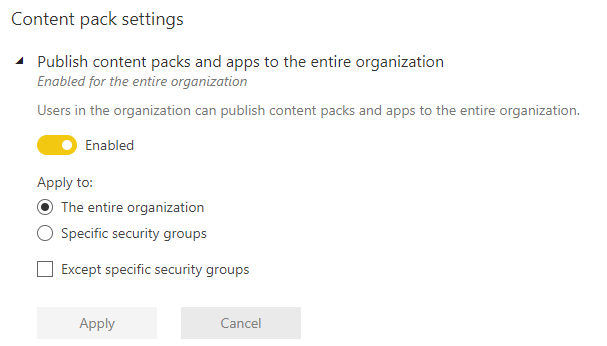
For question 2, there is an option under Admin, then Tenant settings where you can control who can publish content packs and apps for the organization. So this will enable the client to control who can create and publish Content packs and apps.
Join us in Barcelona for FabCon and SQLCon, the Fabric, Power BI, SQL, and AI community event. Save €200 with code FABCMTY200.
If you love stickers, then you will definitely want to check out our community sticker challenge, Barcelona edition!
Check out the July 2026 Power BI update to learn about new features.
| User | Count |
|---|---|
| 11 | |
| 10 | |
| 9 | |
| 5 | |
| 5 |