This time we’re going bigger than ever. Fabric, Power BI, SQL, AI and more. We're covering it all. You won't want to miss it.
Learn moreDid you hear? There's a new SQL AI Developer certification (DP-800). Start preparing now and be one of the first to get certified. Register now
Solved! Go to Solution.
Firstly, it is not possible to prevent users from sharing dashboard from “My Workspace”, a similar thread about this issue has been submitted in this link you can vote it up and add your comments there.
Secondly, currently you can still prevent users from creating app workspace following the instructions in this blog: https://www.kasperonbi.com/disable-power-bi-workspace-or-group-creation-for-certain-users-or-groups/ .
Regards,
Firstly, it is not possible to prevent users from sharing dashboard from “My Workspace”, a similar thread about this issue has been submitted in this link you can vote it up and add your comments there.
Secondly, currently you can still prevent users from creating app workspace following the instructions in this blog: https://www.kasperonbi.com/disable-power-bi-workspace-or-group-creation-for-certain-users-or-groups/ .
Regards,
Hi @emmet63
For question 1, one limitation that you can put in place is for people to not share to others outside their organization.
You can also disable people from sigining up to the Power BI, so even if they did get something shared with them they would not be able to sign in.
https://powerbi.microsoft.com/en-us/blog/ability-to-disable-free-sign-ups-for-the-free-power-bi/
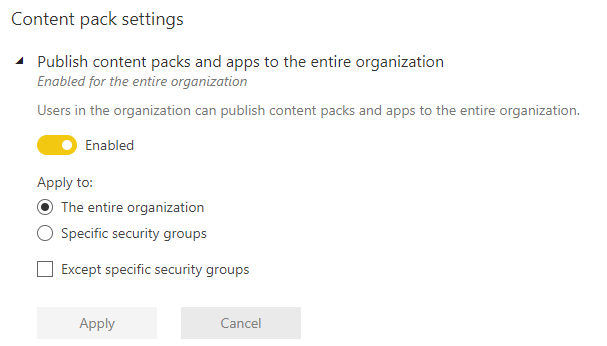
For question 2, there is an option under Admin, then Tenant settings where you can control who can publish content packs and apps for the organization. So this will enable the client to control who can create and publish Content packs and apps.
Check out the April 2026 Power BI update to learn about new features.
Sign up to receive a private message when registration opens and key events begin.
If you have recently started exploring Fabric, we'd love to hear how it's going. Your feedback can help with product improvements.
| User | Count |
|---|---|
| 10 | |
| 8 | |
| 7 | |
| 7 | |
| 7 |
| User | Count |
|---|---|
| 49 | |
| 27 | |
| 21 | |
| 20 | |
| 20 |