
cancel
Showing results for 
Search instead for 
Did you mean: 

Vote for your favorite vizzies from the Power BI Dataviz World Championship submissions. Vote now!

Reply
Anonymous
Not applicable

Share a Workspace

Hello friends, how are you?


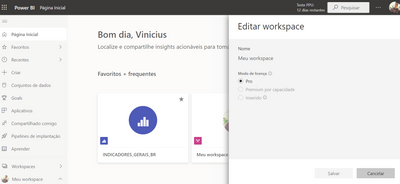
I need to give someone permission to share reports in my workspace, but when i try to share, there is no option to share.


vinicius_ramos_0-1645793450693.png


Who can help me?


OBS: Lenguage is Portuguese.


Tks.

1 ACCEPTED SOLUTION

Hi @Anonymous 

The easiest way to find out if you're a "Member" or "Admin" of a Workspace is that you will have the Access menu, Workspace "Contributors" and "Viewers" do not get the Access menu.

If you can publish into the Workspace, but do not see the Access menu, you must be set up as a "Contributor", "Viewers" cannot publish into a Workspace.

You'll need to find out who created the Workspace and get them to give you the rights you need.

Hope this helps

Stuart

View solution in original post

4 REPLIES 4
Burningsuit
Resident Rockstar
Resident Rockstar

Hi @Anonymous 

Provided you have the permissions in the Workspace, either Admin or Member, you can share the workspace by giving other users Access, use the Access menu in the Workspace.

Burningsuit_0-1645801274835.png

Note that you can't give other users access to "My Workspace" only Workspaces you have permissions to share.

Hope this helps

Stuart


Anonymous
Not applicable

@Burningsuit 

How do I see if I'm an administrator or a member?


Because this workspace is mine, i published the report in it, what i don't understand is how i'm not an admin.


Do you can help me?

Hi @Anonymous 

The easiest way to find out if you're a "Member" or "Admin" of a Workspace is that you will have the Access menu, Workspace "Contributors" and "Viewers" do not get the Access menu.

If you can publish into the Workspace, but do not see the Access menu, you must be set up as a "Contributor", "Viewers" cannot publish into a Workspace.

You'll need to find out who created the Workspace and get them to give you the rights you need.

Hope this helps

Stuart

Anonymous
Not applicable

Thank you!!


Have a nice day.

Helpful resources

Announcements
Power BI DataViz World Championships

Power BI Dataviz World Championships

Vote for your favorite vizzies from the Power BI World Championship submissions!

Sticker Challenge 2026 Carousel

Join our Community Sticker Challenge 2026

If you love stickers, then you will definitely want to check out our Community Sticker Challenge!

January Power BI Update Carousel

Power BI Monthly Update - January 2026

Check out the January 2026 Power BI update to learn about new features.

FabCon Atlanta 2026 carousel

FabCon Atlanta 2026

Join us at FabCon Atlanta, March 16-20, for the ultimate Fabric, Power BI, AI and SQL community-led event. Save $200 with code FABCOMM.