cancel
Showing results for 
Search instead for 
Did you mean: 

The Power BI Data Visualization World Championships is back! Get ahead of the game and start preparing now! Learn more

Reply
MFelix
Super User
Super User

Scheduled refresh has been disabled

Hi to all,


I have a shecudle  refresh on a file and have been receving e-mails that the refresh as been disable. I can active it again hoever after a few days receive the same message see details below:


If you contact support for this issue, please provide them with the following information:
Activity Id: 8d4b039f-e09b-4006-9769-c855b78a64bf
Request Id: ea111932-6d99-46f4-9527-4dc05899cf91
Cluster Name: WABI-US-NORTH-CENTRAL-redirect.analysis.windows.net
Refresh Start Time: 11/08/2016 06:12:12Z
Refresh End Time: 11/08/2016 06:18:00Z


Regards

Miguel Félix


Did I answer your question? Mark my post as a solution!

Proud to be a Super User!

Check out my blog: Power BI em Português


6 REPLIES 6
FollowTheSun
New Member

Hi MFelix,


I am facing the exact issue that you had described. Could you please help me understand, how you solved the problem?


Thanks

v-ljerr-msft
Microsoft Employee
Microsoft Employee

Hi @MFelix,


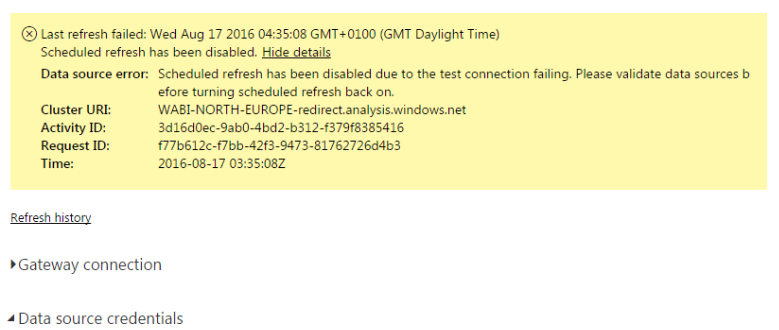
Is there any detail error messages on the Power BI Service Dataset Settings like below when you receive e-mails that the refresh has been disabled.


error.PNG


Based on my research, the schedule refresh can be disabled when "the test connection failing" during a refresh. So I guess is it possible that the gateway cannot connect to the SSAS with some reasons during a schedule refresh which causes the test connection failing and the schedule refresh being disabled?


Regards

GilbertQ
Super User
Super User

@MFelix when you say you connect to a file, is it doing the refresh from an actual file (EG a CSV or Excel File) If this is the case possibly make sure that it is not open when the Gateway is trying to refresh?


Did I answer your question? Mark my post as a solution!

Proud to be a Super User!


Power BI Blog

Hi @GilbertQ I meant to say an SSAS connection and in the PBIX file I used the import option and then connected to the gateway so that i could have the live connection to the SSAS.


Regards

Miguel Félix


Did I answer your question? Mark my post as a solution!

Proud to be a Super User!

Check out my blog: Power BI em Português


Greg_Deckler
Community Champion
Community Champion

Does your refresh fail prior to the refresh being disabled?


Follow on LinkedIn
@ me in replies or I'll lose your thread!!!
Instead of a Kudo, please vote for this idea
Become an expert!: Enterprise DNA
External Tools: MSHGQM
YouTube Channel!: Microsoft Hates Greg
Latest book!:
DAX For Humans

DAX is easy, CALCULATE makes DAX hard...

No, this is a SSAS file in wich I did a import data to do the PBIX file and then whne i upload it to the Power BI portal I connected it to the gatreway. This as been working for about 4 months without any issues in the last month there as been disabling of the refresh I reconnect and it works for a few days and then disables again. We have also several live connections to the SSAS that do not have issues so this is not a Gateway issue.


Regards

Miguel Félix


Did I answer your question? Mark my post as a solution!

Proud to be a Super User!

Check out my blog: Power BI em Português


Helpful resources

Announcements
Power BI DataViz World Championships

Power BI Dataviz World Championships

The Power BI Data Visualization World Championships is back! Get ahead of the game and start preparing now!

December 2025 Power BI Update Carousel

Power BI Monthly Update - December 2025

Check out the December 2025 Power BI Holiday Recap!

FabCon Atlanta 2026 carousel

FabCon Atlanta 2026

Join us at FabCon Atlanta, March 16-20, for the ultimate Fabric, Power BI, AI and SQL community-led event. Save $200 with code FABCOMM.