Learn from the best! Meet the four finalists headed to the FINALS of the Power BI Dataviz World Championships! Register now
I want to remove everything that is on my power bi online service and upload my power bi desktop report again so that the datasets are reset as my scheduled refresh won't work. It mentions that queries are blocking the refresh if I try to do it in the desktop
Solved! Go to Solution.
Hi @Lill ,
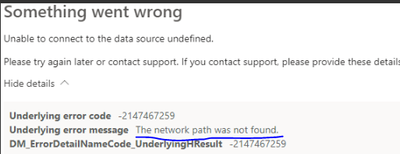
It looks like the error is related to the network path, I looked up this type of error message and hope it helps.
How to Fix the "Network Path Was Not Found" Error on Windows (makeuseof.com)
Network Path Not Found: The Connection Has Not Been Restored - Microsoft Community
Best regards,
Community Support Team Selina zhu
If this post helps, then please consider Accept it as the solution to help the other members find it more quickly
Hi @Lill ,
It looks like the error is related to the network path, I looked up this type of error message and hope it helps.
How to Fix the "Network Path Was Not Found" Error on Windows (makeuseof.com)
Network Path Not Found: The Connection Has Not Been Restored - Microsoft Community
Best regards,
Community Support Team Selina zhu
If this post helps, then please consider Accept it as the solution to help the other members find it more quickly
@GilbertQ thanks for replying.
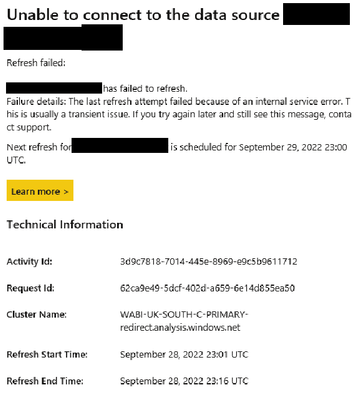
I have had the refersh fail this morning and the following email -
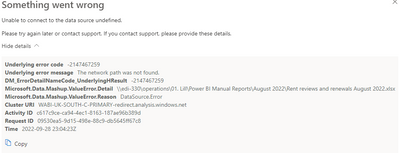
The error against the refreseh on the power BI service is this -
Hi @Lill
Do you have an actual screenshot of the error message you are getting?
You could just re-publish your PBI Desktop file to overwrite what is currently in the Power BI Online service.
| User | Count |
|---|---|
| 24 | |
| 19 | |
| 11 | |
| 10 | |
| 7 |
| User | Count |
|---|---|
| 42 | |
| 36 | |
| 20 | |
| 18 | |
| 16 |