cancel
Showing results for 
Search instead for 
Did you mean: 

Did you hear? There's a new SQL AI Developer certification (DP-800). Start preparing now and be one of the first to get certified. Register now

Reply
brunborg
Frequent Visitor

Refreshing data from REST API works on Desktop, fails on Service

I'm using PowerBI to retrieve data from a REST API, and this works fine on Desktop but fails to refresh (either scheduled or manual) on Service, using Anonymous access. 

Untitled.png


The code is 


    auth = "Basic " & Binary.ToText(Text.ToBinary("user:pwd", BinaryEncoding.Base64)),
    fields = "{""result"":""*""}",
    url = "https://<url>",
    Source = Json.Document(Web.Contents(url, [Query=[pageNumber="1", limit="2000", sort="key(DS)"], Headers=[Authorization=auth,Fields=fields]])),

I am able to refresh a different data source using Basic auth with the same username/password, however I need to use the [fields] option to define which fields the response should return - so I need the Anonymous. 


1 ACCEPTED SOLUTION
Jayendran
Solution Sage
Solution Sage

Hi @brunborg ,


I think it's this error is not releated to the headers (fields). Basically the autentication is you are handling with your side using your own Basic Autentication from the Power Query. If you choose the Anonymous it will override all the autentication in your report. Can you just try to use a gateway for your case ?


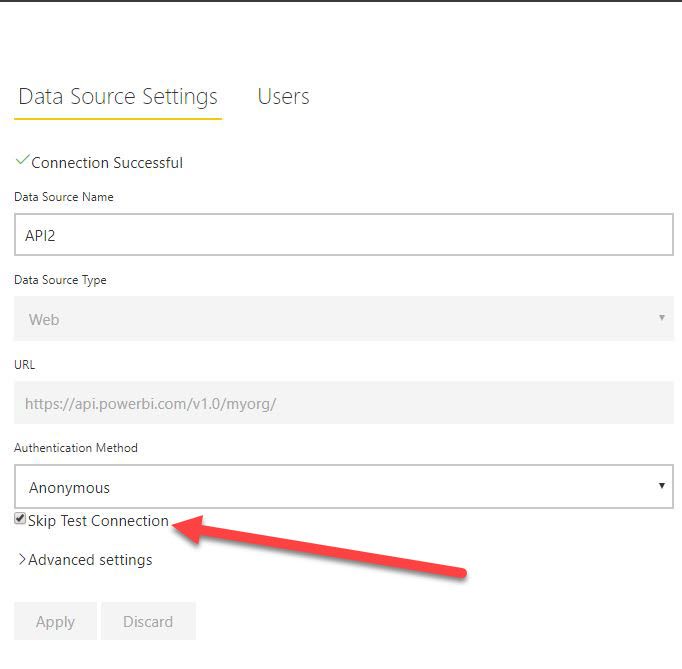
Using the gateway,there is an option called Skip Connection.


6.2.JPG


You can also follow my article for the reference, which I've dealt with the same sort of process.

https://community.powerbi.com/t5/Community-Blog/Power-BI-Gateway-Monitoring-amp-Administrating-Part-...


View solution in original post

3 REPLIES 3
Jayendran
Solution Sage
Solution Sage

Hi @brunborg ,


I think it's this error is not releated to the headers (fields). Basically the autentication is you are handling with your side using your own Basic Autentication from the Power Query. If you choose the Anonymous it will override all the autentication in your report. Can you just try to use a gateway for your case ?


Using the gateway,there is an option called Skip Connection.


6.2.JPG


You can also follow my article for the reference, which I've dealt with the same sort of process.

https://community.powerbi.com/t5/Community-Blog/Power-BI-Gateway-Monitoring-amp-Administrating-Part-...


Thanks for posting this solution I managed to refresh in power bi service only time will tell if the fresh data will pull through but have been working on this issue for days, 


the blog post says when you enter your credentials in settings then you are overiding your authentication method in power query, so you need to create a gateway connection with skip test selected. 

Thank you, very helpful!

Helpful resources

Announcements
April Power BI Update Carousel

Power BI Monthly Update - April 2026

Check out the April 2026 Power BI update to learn about new features.

Fabric SQL PBI Data Days

Data Days 2026 coming soon!

Sign up to receive a private message when registration opens and key events begin.

New to Fabric survey Carousel

New to Fabric Survey

If you have recently started exploring Fabric, we'd love to hear how it's going. Your feedback can help with product improvements.

Power BI DataViz World Championships carousel

Power BI DataViz World Championships - June 2026

A new Power BI DataViz World Championship is coming this June! Don't miss out on submitting your entry.