cancel
Showing results for 
Search instead for 
Did you mean: 

July 7 - July 17 | Round 2 of the Power BI Dataviz World Championships. Don't miss your chance! Learn more

Reply
brunborg
Frequent Visitor

Refreshing data from REST API works on Desktop, fails on Service

I'm using PowerBI to retrieve data from a REST API, and this works fine on Desktop but fails to refresh (either scheduled or manual) on Service, using Anonymous access. 

Untitled.png


The code is 


    auth = "Basic " & Binary.ToText(Text.ToBinary("user:pwd", BinaryEncoding.Base64)),
    fields = "{""result"":""*""}",
    url = "https://<url>",
    Source = Json.Document(Web.Contents(url, [Query=[pageNumber="1", limit="2000", sort="key(DS)"], Headers=[Authorization=auth,Fields=fields]])),

I am able to refresh a different data source using Basic auth with the same username/password, however I need to use the [fields] option to define which fields the response should return - so I need the Anonymous. 


1 ACCEPTED SOLUTION
Jayendran
Solution Sage
Solution Sage

Hi @brunborg ,


I think it's this error is not releated to the headers (fields). Basically the autentication is you are handling with your side using your own Basic Autentication from the Power Query. If you choose the Anonymous it will override all the autentication in your report. Can you just try to use a gateway for your case ?


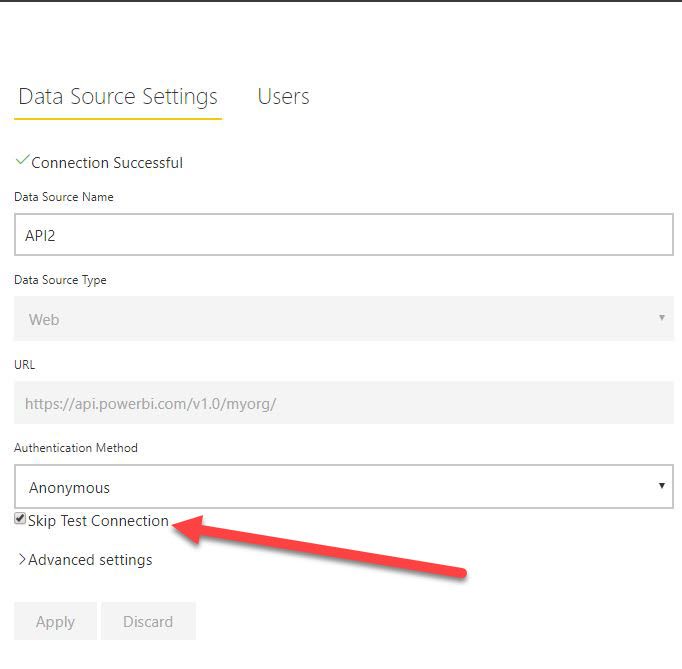
Using the gateway,there is an option called Skip Connection.


6.2.JPG


You can also follow my article for the reference, which I've dealt with the same sort of process.

https://community.powerbi.com/t5/Community-Blog/Power-BI-Gateway-Monitoring-amp-Administrating-Part-...


View solution in original post

3 REPLIES 3
Jayendran
Solution Sage
Solution Sage

Hi @brunborg ,


I think it's this error is not releated to the headers (fields). Basically the autentication is you are handling with your side using your own Basic Autentication from the Power Query. If you choose the Anonymous it will override all the autentication in your report. Can you just try to use a gateway for your case ?


Using the gateway,there is an option called Skip Connection.


6.2.JPG


You can also follow my article for the reference, which I've dealt with the same sort of process.

https://community.powerbi.com/t5/Community-Blog/Power-BI-Gateway-Monitoring-amp-Administrating-Part-...


Thanks for posting this solution I managed to refresh in power bi service only time will tell if the fresh data will pull through but have been working on this issue for days, 


the blog post says when you enter your credentials in settings then you are overiding your authentication method in power query, so you need to create a gateway connection with skip test selected. 

Thank you, very helpful!

Helpful resources

Announcements
FabCon and SQLCon Barcelona 2026

FabCon & SQLCon – Barcelona 2026

Join us in Barcelona for FabCon and SQLCon, the Fabric, Power BI, SQL, and AI community event. Save €200 with code FABCMTY200.

60 days of Data Days Carousel

Data Days 2026

Join Data Days 2026: 60 days of free live/on-demand sessions, challenges, study groups, and certification opportunities.

Power BI DataViz World Championships carousel

Power BI DataViz World Championships - June 2026

A new Power BI DataViz World Championship is coming this June! Don't miss out on submitting your entry.

Top Kudoed Authors