cancel
Showing results for 
Search instead for 
Did you mean: 

The Power BI Data Visualization World Championships is back! Get ahead of the game and start preparing now! Learn more

Reply
Cado_one
Resolver III
Resolver III

Refresh problem - Unable to combine data

Hi all,


I know there are already many topics regarding this issue but the common solution doesn't work in my case and I can't explain the reason.

When refreshing on Power BI Desktop everything is fine, when doing it on Power BI Service refresh fails and return the following error : 

  • [Unable to combine data] Section1/[Query]/[Last step of the query] references other queries or steps, so it may not directly access a data source. Please rebuild this data combination.

To work around this problem, I followed the following Ken Puls blog : https://www.excelguru.ca/blog/2015/03/11/power-query-errors-please-rebuild-this-data-combination/


However, even after staging queries as recommended the error is still present !


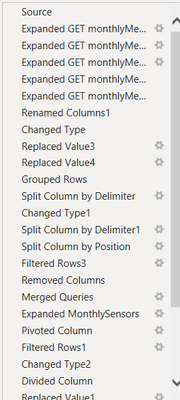
Here are my queries (Query 1's refresh is okay but the second and third queries's refresh give the error) :
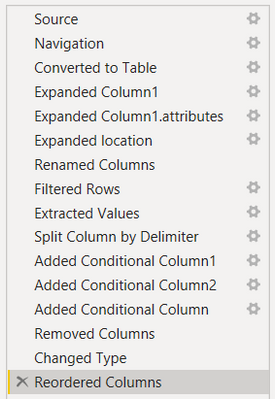
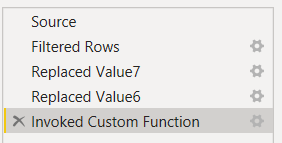
 

query1.pngquery2.pngquery3.png

                       Query1                                                      Query2                                       Query3


The "Source" step of Query3 is Query2 and the "Source" of Query2 is Query1


A few details :

- The Query1 datasource is a web API GET request

- The "Invoked Custom Function" step in Query2 apply a web API GET request on each ID of the column resulting from Query1

- The "Merged Queries" step in Query3 merge with an other table which is also built on a web API GET request

- Every data in the final result comes from the same API


Where did I miss something during my rebuild operations ?


Thanks in advance !

Best regards,

Cado

1 ACCEPTED SOLUTION

Hi @v-jingzhang 


Thank you for the suggestion link, 

the solution was to put every stages used for the query in a single BIG query.

Not elegant but it works.


Thanks !

Cado

View solution in original post

2 REPLIES 2
v-jingzhang
Community Support
Community Support

Hi @v-jingzhang 


Thank you for the suggestion link, 

the solution was to put every stages used for the query in a single BIG query.

Not elegant but it works.


Thanks !

Cado

Helpful resources

Announcements
Power BI DataViz World Championships

Power BI Dataviz World Championships

The Power BI Data Visualization World Championships is back! Get ahead of the game and start preparing now!

December 2025 Power BI Update Carousel

Power BI Monthly Update - December 2025

Check out the December 2025 Power BI Holiday Recap!

FabCon Atlanta 2026 carousel

FabCon Atlanta 2026

Join us at FabCon Atlanta, March 16-20, for the ultimate Fabric, Power BI, AI and SQL community-led event. Save $200 with code FABCOMM.