cancel
Showing results for 
Search instead for 
Did you mean: 

Data Days is here! Join us now for 60+ days of learning, challenges, and connection. Learn more

Reply
Ras44
New Member

Refresh error

Hello,


I am experiencing issues with my dataset refreshing. I am not experiencing any issues in my desktop version, however once I publish the report to app.PowerBI.com I am no longer able to manually or automatically refresh. I receive this message, "You can't schedule refresh for this dataset because the following data sources currently don't support refresh:" I'm sourcing a local Excel file with a pivot table that is pulling data from a second excel file. There are no crednetials needed for either files they are both public. There are no functions or equations in the pivot table, the first excel sheet does the equations so the second one (the one I'm pulling from) only has the raw data. 


Can this be fixed?


Thank you,

Collin

1 ACCEPTED SOLUTION
otravers
Community Champion
Community Champion

If you want to refresh local files from the Power BI service, you need to install the Power BI data gateway on your PC. It's usually easier (i.e. no gateway needed) to sync the files to OneDrive or SharePoint and refresh the files from there.

------------------------------------------------
1. How to get your question answered quickly - good questions get good answers!
2. Learning how to fish > being spoon-fed without active thinking.
3. Please accept as a solution posts that resolve your questions.
------------------------------------------------
BI Blog: Datamarts | RLS/OLS | Dev Tools | Languages | Aggregations | XMLA/APIs | Field Parameters | Custom Visuals

View solution in original post

4 REPLIES 4
eriku
Regular Visitor

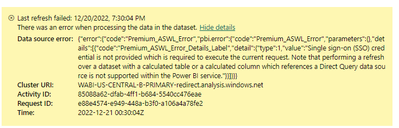
I'm having a similar issue. can't seem to figure it out. does anyone have any thoughts?  

Screenshot_20221220_074039.png

otravers
Community Champion
Community Champion

If you want to refresh local files from the Power BI service, you need to install the Power BI data gateway on your PC. It's usually easier (i.e. no gateway needed) to sync the files to OneDrive or SharePoint and refresh the files from there.

------------------------------------------------
1. How to get your question answered quickly - good questions get good answers!
2. Learning how to fish > being spoon-fed without active thinking.
3. Please accept as a solution posts that resolve your questions.
------------------------------------------------
BI Blog: Datamarts | RLS/OLS | Dev Tools | Languages | Aggregations | XMLA/APIs | Field Parameters | Custom Visuals

Oh ok, that would explain why I've never had this issue with my sharepoint data sources. Thank you for the help! Is it relatively simple to install the data gateway? I clearly haven't yet. 

otravers
Community Champion
Community Champion

Yes, unless you're moving a lot of data through the data gateway (which may introduce the need for clustering), at a small scale it's a fast and easy install. You'll have to update it in the future to keep up with Power BI Desktop updates, but that's again pretty straightforward.

------------------------------------------------
1. How to get your question answered quickly - good questions get good answers!
2. Learning how to fish > being spoon-fed without active thinking.
3. Please accept as a solution posts that resolve your questions.
------------------------------------------------
BI Blog: Datamarts | RLS/OLS | Dev Tools | Languages | Aggregations | XMLA/APIs | Field Parameters | Custom Visuals

Helpful resources

Announcements
Fabric Data Days is here Carousel

Fabric Data Days 2026

Don't miss out on Data Days, June 15 through August 7. Learn Fabric, Power BI, SQL, AI and more.

May Power BI Update Carousel

Power BI Monthly Update - May 2026

Check out the May 2026 Power BI update to learn about new features.

Power BI DataViz World Championships carousel

Power BI DataViz World Championships - June 2026

A new Power BI DataViz World Championship is coming this June! Don't miss out on submitting your entry.