cancel
Showing results for 
Search instead for 
Did you mean: 

July 28 - August 9 | Final Round of the Power BI Dataviz World Championships. This is your chance. Learn more

Reply
FormigoJoao
Frequent Visitor

Refresh Visuals on Service

Hello everyone,

Hope you are doing well,

Issue:
   I have a push dataset which I built a report from and this dataset is being injected with data every 2 minutes but the report I have published on the Service won't update the visuals with this new data unless someone clicks on the top right corner to "Refresh Visuals".


What I am looking for:
   To refresh the visuals of the page in an automatic way so that it will grab the latest data.

Since it is a push dataset I don't seem to be able to configure the "Page Refresh" option that there is for when the source is Direct Query. With this, is there any other way to have it Refresh the visuals automatically?


Tried:
I also tried the "PowerBIIntegration.Refresh()" in PowerAPPs but this does not work as well.
I also looked into custom visuals that might do this and found one but it doesn't work.

Thank you in advance,


1 ACCEPTED SOLUTION
v-kkf-msft
Community Support
Community Support

Hi @FormigoJoao ,


Please try dashboards, and mentioned here, for a Push Dataset:


Once a report is created using the push dataset, any of its visuals can be pinned to a dashboard. On that dashboard, visuals update in real-time whenever the data is updated. Within the service, the dashboard is triggering a tile refresh every time new data is received.

There are considerations to note about pinned tiles from a push dataset:

  • Pinning an entire report using the pin live page option will not result in the data automatically being updated.


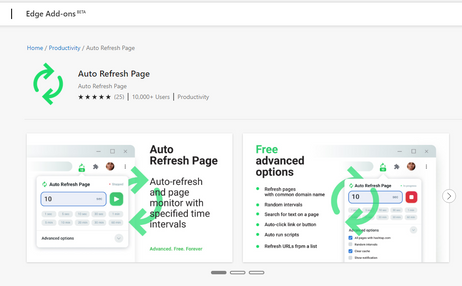
Or try using a plug-in that automatically refreshes the browser page, like the Auto Refresh Page plugin in Edge.
 

vkkfmsft_0-1650874199110.png


If the problem is still not resolved, please provide detailed error information or the expected result you expect. Let me know immediately, looking forward to your reply.
Best Regards,
Winniz
If this post helps, then please consider Accept it as the solution to help the other members find it more quickly.


View solution in original post

1 REPLY 1
v-kkf-msft
Community Support
Community Support

Hi @FormigoJoao ,


Please try dashboards, and mentioned here, for a Push Dataset:


Once a report is created using the push dataset, any of its visuals can be pinned to a dashboard. On that dashboard, visuals update in real-time whenever the data is updated. Within the service, the dashboard is triggering a tile refresh every time new data is received.

There are considerations to note about pinned tiles from a push dataset:

  • Pinning an entire report using the pin live page option will not result in the data automatically being updated.


Or try using a plug-in that automatically refreshes the browser page, like the Auto Refresh Page plugin in Edge.


vkkfmsft_0-1650874199110.png


If the problem is still not resolved, please provide detailed error information or the expected result you expect. Let me know immediately, looking forward to your reply.
Best Regards,
Winniz
If this post helps, then please consider Accept it as the solution to help the other members find it more quickly.


Helpful resources

Announcements
Fabric Community Sticker Design Challenge Barcelona Carousel

Fabric Community Sticker Challenge - Barcelona 2026

If you love stickers, then you will definitely want to check out our community sticker challenge, Barcelona edition!

July Power BI Update Carousel

Power BI Monthly Update - July 2026

Check out the July 2026 Power BI update to learn about new features.

Power BI DataViz World Championships carousel

Power BI DataViz World Championships - June 2026

A new Power BI DataViz World Championship is coming this June! Don't miss out on submitting your entry.

Top Kudoed Authors