Don't miss your chance to take the Fabric Data Engineer (DP-600) exam for FREE! Find out how by attending the DP-600 session on April 23rd (pacific time), live or on-demand.
Learn moreNext up in the FabCon + SQLCon recap series: The roadmap for Microsoft SQL and Maximizing Developer experiences in Fabric. All sessions are available on-demand after the live show. Register now
I have a power bi Report on powerbi.com that access Azure Data lakes for it's data. Currently it's running under my own personal credentials but I need to to leverage an Azure Client/App Service Principle.
How can I set up the powerbi refresh leveraging the service principle Id/Secret, or better yet access the keyvault to get the secret when it performs the refresh?
Hi @Tdawg90 ,
You should change it in Power BI side and republish the report.
Can you elaborate? The end goal is to have the data auto-refresh daily from Azure Data lakes utilizing non-personal credentials, idealy a Service Principle
Hey did you manage to get this sorted?
I am busy going down the same route - especially since my user account requires a PIM which only lasts 9 hours
This was a while ago with Gen1, today using Azure Data Lakes Gen2, (it should be there for Gen1 and I don't know what was going on back in 2019 😄 ) we can easily use an Access Key to a Azure Blob Storage.
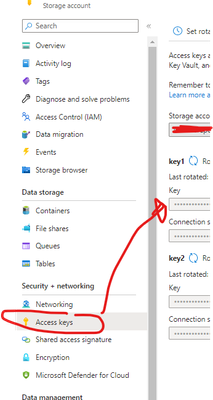
Add the full url to the blob container. It will then prompt you for an Access/Account Key, which you can find in your storage account,
If you have recently started exploring Fabric, we'd love to hear how it's going. Your feedback can help with product improvements.
A new Power BI DataViz World Championship is coming this June! Don't miss out on submitting your entry.
Experience the highlights from FabCon & SQLCon, available live and on-demand starting April 14th.
| User | Count |
|---|---|
| 11 | |
| 10 | |
| 9 | |
| 8 | |
| 8 |