Join us at FabCon Atlanta from March 16 - 20, 2026, for the ultimate Fabric, Power BI, AI and SQL community-led event. Save $200 with code FABCOMM.
Register now!Learn from the best! Meet the four finalists headed to the FINALS of the Power BI Dataviz World Championships! Register now
I have a power bi Report on powerbi.com that access Azure Data lakes for it's data. Currently it's running under my own personal credentials but I need to to leverage an Azure Client/App Service Principle.
How can I set up the powerbi refresh leveraging the service principle Id/Secret, or better yet access the keyvault to get the secret when it performs the refresh?
Hi @Tdawg90 ,
You should change it in Power BI side and republish the report.
Can you elaborate? The end goal is to have the data auto-refresh daily from Azure Data lakes utilizing non-personal credentials, idealy a Service Principle
Hey did you manage to get this sorted?
I am busy going down the same route - especially since my user account requires a PIM which only lasts 9 hours
This was a while ago with Gen1, today using Azure Data Lakes Gen2, (it should be there for Gen1 and I don't know what was going on back in 2019 😄 ) we can easily use an Access Key to a Azure Blob Storage.
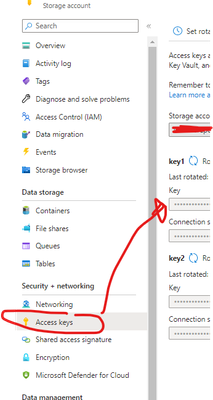
Add the full url to the blob container. It will then prompt you for an Access/Account Key, which you can find in your storage account,
Share feedback directly with Fabric product managers, participate in targeted research studies and influence the Fabric roadmap.
Check out the February 2026 Power BI update to learn about new features.