Don't miss your chance to take the Fabric Data Engineer (DP-700) exam on us!
Learn moreNext up in the FabCon + SQLCon recap series: The roadmap for Microsoft SQL and Maximizing Developer experiences in Fabric. All sessions are available on-demand after the live show. Register now
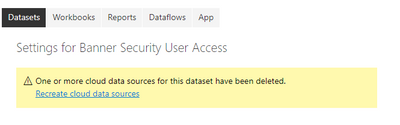
Why are we now seeing the following alert message in Power BI Dataset Settings when taking over the configuration?
One or more cloud resources for this dataset have been deleted.
Recreate cloud data sources <-- this link shows a useless link to "mailto:" in a dialog box
We are using a local gateway connection only for this dataset / report. Our team should all "own" this together, without changes between users.
Is there a reason the settings get deleted every time you "take over" a dataset?
I see now this is by design. I would like to propose having this owned by a group of individuals who are responsible for configuration.
Hi @jonsullivan ,
One of your data source is not reachable. Check the datasource in Manage Gateway or you need to remap the dataset to it in gateway connection.
Best Regards,
Jay
Hi @jonsullivan
I would suspect this is happening because when you take over a cloud dataset the previous credentials were linked to the user who owned the dataset.
When you take over, it can no longer use someone else's credentials and you have to authenticate again with your credentials?
If you have recently started exploring Fabric, we'd love to hear how it's going. Your feedback can help with product improvements.
A new Power BI DataViz World Championship is coming this June! Don't miss out on submitting your entry.
Share feedback directly with Fabric product managers, participate in targeted research studies and influence the Fabric roadmap.