Get certified for free when you join Fabric Data Days 2026 and dive into Fabric, Power BI, SQL, AI, and other essential data skills.
Join nowJuly 7 - July 17 | Round 2 of the Power BI Dataviz World Championships. Don't miss your chance! Learn more
Hi everyone!
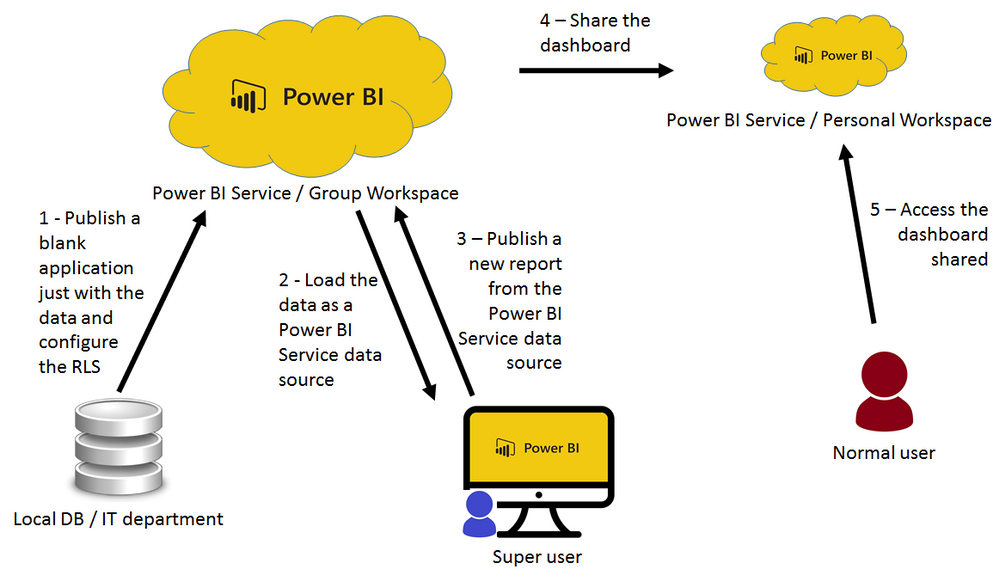
I am having problems with RLS when I use Power BI Service Data Source. I am using the Power BI Data Source to share databases to “super” users. With this, the super users can to develop application in Power BI Desktop and use the data as a content pack. Follow the model:
Model
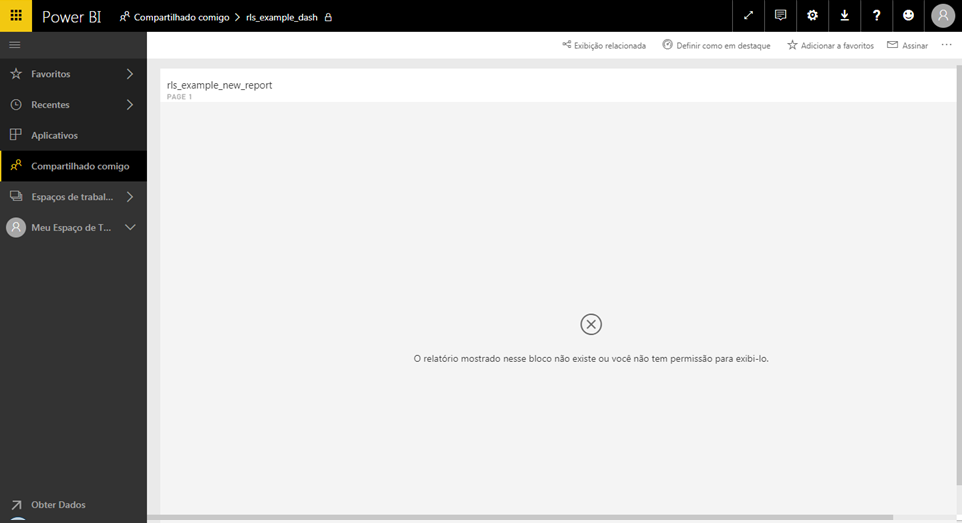
Well, all was going fine until I configure RLS in the database. When I did this the application developed by super user turns instable. In the first time that the a “normal” user access the shared dashboard it’s ok, all works fine and the data are filter according with RLS (step 5). However, when a screen refresh (F5) is done or logout and login back, the message “The report shown in this tile doesn’t exist or you don’t have permission to view it.” is showed. After that, the only way to back to work is accessing another dashboard, press F5 and back to the Dashboard with RLs and then it works ok until a new screen refresh or login/logout.
Anyone have the same problem or can help me with this?
Thanks!
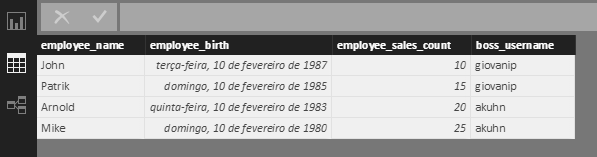
Data
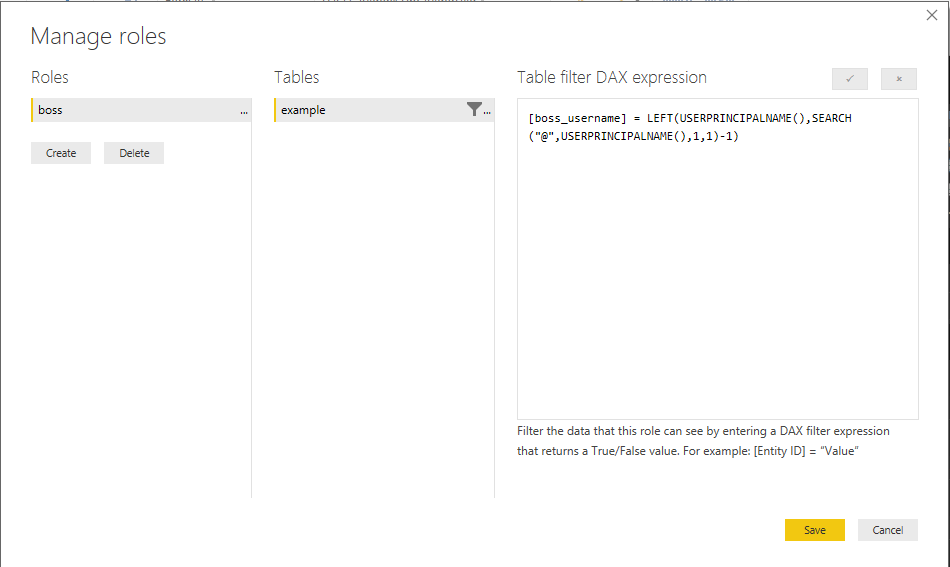
Role definition
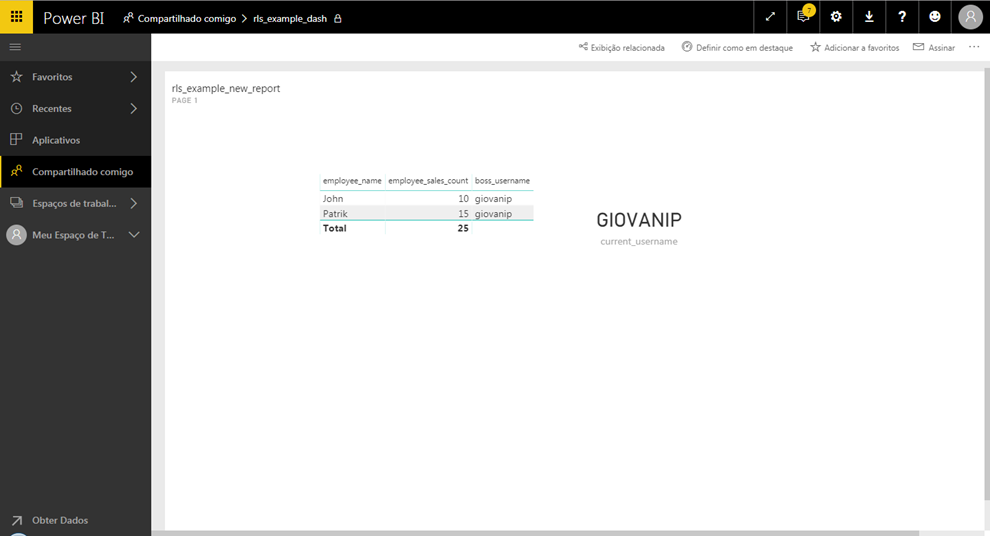
Shared dash working
Shared dash doesn't working
Solved! Go to Solution.
I haven't reproduced your issue. I followed your steps:
1. Publish a blank report with RLS configured
2. Get data from this dataset in Power BI Desktop by Admin user
3. Publish a new report onto Power BI Service and create dashboard.
4. Share dashboard to Normal user.
My end users can always view corresponding data after "F5" refresh or "logout/login back".
In this scenario, both reports are fed with same dataset, and your end user can view the correct data initially. It should have no permission issue.
Please open Fiddler to capture the request and see the detail error message when refreshing screen. If the issue persists, please you may create a support ticket.
Regards,
I haven't reproduced your issue. I followed your steps:
1. Publish a blank report with RLS configured
2. Get data from this dataset in Power BI Desktop by Admin user
3. Publish a new report onto Power BI Service and create dashboard.
4. Share dashboard to Normal user.
My end users can always view corresponding data after "F5" refresh or "logout/login back".
In this scenario, both reports are fed with same dataset, and your end user can view the correct data initially. It should have no permission issue.
Please open Fiddler to capture the request and see the detail error message when refreshing screen. If the issue persists, please you may create a support ticket.
Regards,
I don't know what happened. Some days after my post, the problem didn't occurs more. Maybe a Power Bi Service update? Thanks for the attention.
Join us in Barcelona for FabCon and SQLCon, the Fabric, Power BI, SQL, and AI community event. Save €200 with code FABCMTY200.
Join Fabric Data Days 2026: 60 days of free live/on-demand sessions, challenges, study groups, and certification opportunities.
| User | Count |
|---|---|
| 16 | |
| 13 | |
| 8 | |
| 8 | |
| 5 |
| User | Count |
|---|---|
| 30 | |
| 27 | |
| 25 | |
| 24 | |
| 24 |