cancel
Showing results for 
Search instead for 
Did you mean: 

We've captured the moments from FabCon & SQLCon that everyone is talking about, and we are bringing them to the community, live and on-demand. Starts on April 14th. Register now

Reply
Anonymous
Not applicable

RLS - How to Create Groups

Hello,

I am trying to implement RLS in Power BI.

On the Desktop, I have created Roles and Assigned Rules to them.

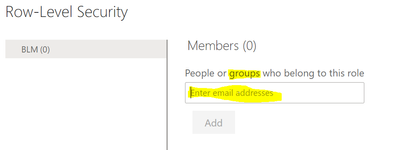
In the Service, I can add users one by one.  But I need to add hundreds of users via a group.  


Can anyone please provide step by step instructions on how to create groups of users that I can enter so I don't have to enter users individually?


pkbidani_0-1642439807453.png

Many Thanks!!


Pavan


1 ACCEPTED SOLUTION
Anonymous
Not applicable

Hi @Anonymous 

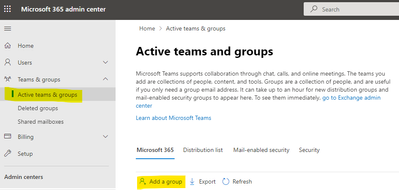
You can create a group in Microsoft 365 admin center with global admin or user admin . Then you can add user in the group you created before .

Microsoft's official documentation details how to create groups and how to add users to groups, you can refer to it .

https://docs.microsoft.com/en-us/microsoft-365/admin/create-groups/create-groups?view=o365-worldwide

Ailsamsft_0-1642652179773.png

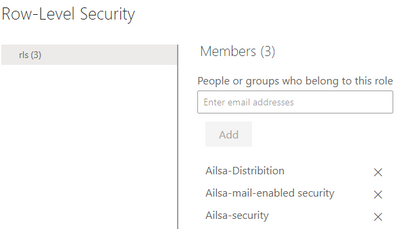
Then you can search and add the group in RLS .

Ailsamsft_1-1642652179775.png

Best Regard

Community Support Team _ Ailsa Tao

If this post helps, then please consider Accept it as the solution to help the other members find it more quickly.

View solution in original post

4 REPLIES 4
Anonymous
Not applicable

Hi @Anonymous 

You can create a group in Microsoft 365 admin center with global admin or user admin . Then you can add user in the group you created before .

Microsoft's official documentation details how to create groups and how to add users to groups, you can refer to it .

https://docs.microsoft.com/en-us/microsoft-365/admin/create-groups/create-groups?view=o365-worldwide

Ailsamsft_0-1642652179773.png

Then you can search and add the group in RLS .

Ailsamsft_1-1642652179775.png

Best Regard

Community Support Team _ Ailsa Tao

If this post helps, then please consider Accept it as the solution to help the other members find it more quickly.

Anonymous
Not applicable

Hi Collin,

Many Thanks!  I do like Guy In A Cube videos.

I this video, it shows how to use the Groups he alread created.

I am looking for step by step guidance on how to create the groups.

Regards,

Pavan

Hi @Anonymous ,


This is laid out pretty well by @GilbertQ in the post below.  The answer to your specific question about exactly HOW to do it depends a bit on the group you pick.  For example, if you are using Security Group, that is created in ADD or O365.

Power BI – Which Groups can be used to set Permissions in Power BI - Reporting/Analytics Made easy with FourMoo and Power BI


Did I answer your question? Mark my post as a solution!

Proud to be a Datanaut!
Private message me for consulting or training needs.


collinq
Super User
Super User

Hi @Anonymous ,


This link should help show you want you are asking:

Can you use GROUPS with Power BI Row-Level Security (RLS)??? - Guy in a Cube


Did I answer your question? Mark my post as a solution!

Proud to be a Datanaut!
Private message me for consulting or training needs.


Helpful resources

Announcements
New to Fabric survey Carousel

New to Fabric Survey

If you have recently started exploring Fabric, we'd love to hear how it's going. Your feedback can help with product improvements.

Power BI DataViz World Championships carousel

Power BI DataViz World Championships - June 2026

A new Power BI DataViz World Championship is coming this June! Don't miss out on submitting your entry.

Join our Fabric User Panel

Join our Fabric User Panel

Share feedback directly with Fabric product managers, participate in targeted research studies and influence the Fabric roadmap.

March Power BI Update Carousel

Power BI Community Update - March 2026

Check out the March 2026 Power BI update to learn about new features.