cancel
Showing results for 
Search instead for 
Did you mean: 

July 7 - July 17 | Round 2 of the Power BI Dataviz World Championships. Don't miss your chance! Learn more

Reply
winter2805
Advocate I
Advocate I

RLS Help

Hi All,

I'm new in Power BI.

I need to implement RLS but when I create new role and set the filter for my table, the role doesn't work!

I follow the tutorial into documentation page of Power BI.

When I test my role I see all data for the user that I must restrict data.

I use the latest versione of Power BI Desktop and I use the gateway enterprise.

My DB is a SQL SERVER EXPRESS DB.

The role name is Vendor01 and the filter of my table is set as the follow

- table Invoice --> this is table number 4 into list of all table

- [vendorcode] = "S04" <-- this is the extact syntax


Please help me.

3 REPLIES 3
Greg_Deckler
Community Champion
Community Champion

See this article by @ankitpatira. I believe that when I tested this, I had to use the syntax shown in the article and include the table name. So, in your case, try:


Invoice[vendorcode]="S04"


http://community.powerbi.com/t5/Community-Blog/Row-Level-Security-in-Power-BI/ba-p/31031


Follow on LinkedIn
@ me in replies or I'll lose your thread!!!
Instead of a Kudo, please vote for this idea
Become an expert!: Enterprise DNA
External Tools: MSHGQM
YouTube Channel!: Microsoft Hates Greg
Latest book!:
DAX For Humans

DAX is easy, CALCULATE makes DAX hard...

Hi,

I use the syntax that you propose but doesn't work.

When I test the roles with ellipse "Test As Role" my report became empty and all object have "X - View Details" icon.

My e-mail is in a group.

I don't understand the problem.

Another thing: I put VendorCode as report filter also but doesn't work yet.


Can you help me?

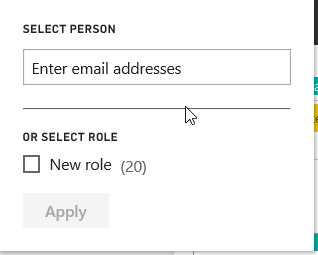
When you select test as role, you get two options


Role Test.png

 Type in the username in the bot that says enter email address. This should filter your report.


Helpful resources

Announcements
FabCon and SQLCon Barcelona 2026

FabCon & SQLCon – Barcelona 2026

Join us in Barcelona for FabCon and SQLCon, the Fabric, Power BI, SQL, and AI community event. Save €200 with code FABCMTY200.

60 days of Data Days Carousel

Data Days 2026

Join Fabric Data Days 2026: 60 days of free live/on-demand sessions, challenges, study groups, and certification opportunities.

Power BI DataViz World Championships carousel

Power BI DataViz World Championships - June 2026

A new Power BI DataViz World Championship is coming this June! Don't miss out on submitting your entry.