cancel
Showing results for 
Search instead for 
Did you mean: 

Data Days is here! Join us now for 60+ days of learning, challenges, and connection. Learn more

Reply
amitg
New Member

Query string parameters in URL returns error

Hey all,

I have a published report (in a group app & workspace).

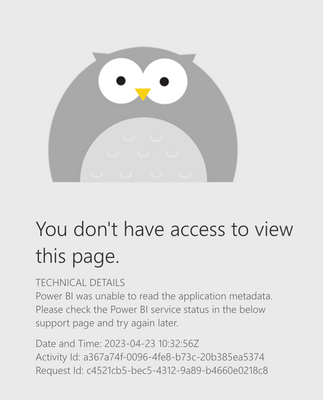
When tried to add a filter to the URL link it returned the error in the attached screenshot.

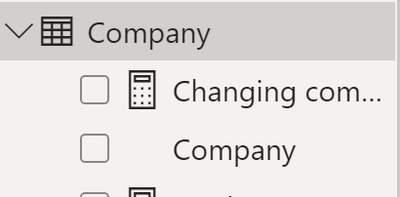
Also attached the table & field themselves.

Tried both from the app link and the workspace link.

Link - 

https://app.powerbi.com/groups/me/apps/0eaffa71-7cc1-4bea-8faa-dc83fb69896d/reports/651dabf7-eb10-4b...?filter=Company/Company eq 'Viewer'

amitg_1-1682246461383.png


amitg_0-1682246326006.png


1 REPLY 1
Greg_Deckler
Community Champion
Community Champion

@amitg I can't replicate this exactly but I will say that I have never had much luck with query string parameters in the Service. You could check the Issues forum here:

https://community.powerbi.com/t5/Issues/idb-p/Issues

And if it is not there, then you could post it.

If you have Pro account you could try to open a support ticket. If you have a Pro account it is free. Go to https://support.powerbi.com. Scroll down and click "CREATE SUPPORT TICKET".


Follow on LinkedIn
@ me in replies or I'll lose your thread!!!
Instead of a Kudo, please vote for this idea
Become an expert!: Enterprise DNA
External Tools: MSHGQM
YouTube Channel!: Microsoft Hates Greg
Latest book!:
DAX For Humans

DAX is easy, CALCULATE makes DAX hard...

Helpful resources

Announcements
Fabric Data Days is here Carousel

Fabric Data Days 2026

Don't miss out on Data Days, June 15 through August 7. Learn Fabric, Power BI, SQL, AI and more.

May Power BI Update Carousel

Power BI Monthly Update - May 2026

Check out the May 2026 Power BI update to learn about new features.

Power BI DataViz World Championships carousel

Power BI DataViz World Championships - June 2026

A new Power BI DataViz World Championship is coming this June! Don't miss out on submitting your entry.