
Join us at FabCon Atlanta from March 16 - 20, 2026, for the ultimate Fabric, Power BI, AI and SQL community-led event. Save $200 with code FABCOMM.
Register now!Learn from the best! Meet the four finalists headed to the FINALS of the Power BI Dataviz World Championships! Register now
I've connected a dataset from BI service and used BI Desktop report analyzer to create my dataset. When I try to create a parame ter using query designer I get this message: "Cannot find cube". An explaintion for what is going wron would be helpful.
you will need to share some more details, maybe the M code, screenshoots samples, the error code you getting etc, that help for people to be able to give a more exact response
Proud to be a Super User!
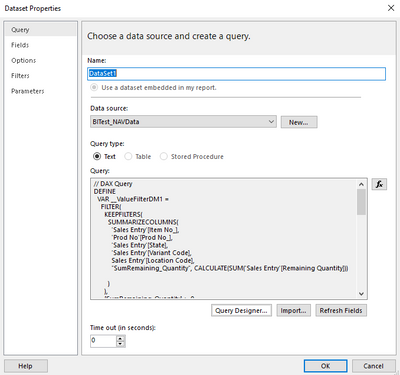
Thanks Stefano. Please see below
// DAX Query
DEFINE
VAR __ValueFilterDM1 =
FILTER(
KEEPFILTERS(
SUMMARIZECOLUMNS(
'Sales Entry'[Item No_],
'Prod No'[Prod No_],
'Sales Entry'[State],
'Sales Entry'[Variant Code],
Sales Entry'[Location Code],
"SumRemaining_Quantity", CALCULATE(SUM('Sales Entry'[Remaining Quantity]))
)
),
[SumRemaining_Quantity] > 0
)
VAR __DS0Core =
SUMMARIZECOLUMNS(
ROLLUPADDISSUBTOTAL(
ROLLUPGROUP(
'Sales Entry'[Item No_],
'Prod No'[Prod No_],
'Sales Entry'[State],
'Sales Entry'[Variant Code],
'Sales Entry'[Location Code]
), "IsGrandTotalRowTotal"
),
__ValueFilterDM1,
"SumRemaining_Quantity", CALCULATE(SUM('Sales Entry'[Remaining Quantity]))
)
VAR __DS0PrimaryWindowed =
TOPN(
502,
__DS0Core,
[IsGrandTotalRowTotal],
0,
'Sales Entry'[Item No_],
1,
'Prod No'[Prod No_],
1,
'Sales Entry'[State],
1,
'Sales Entry'[Variant Code],
1,
'Sales Entry'[Location Code],
1
)
EVALUATE
__DS0PrimaryWindowed
ORDER BY
'Prod No'[Prod No_]
Hi there, I am facing this same issue. Did you ever find an answer to it?
Share feedback directly with Fabric product managers, participate in targeted research studies and influence the Fabric roadmap.
Check out the February 2026 Power BI update to learn about new features.