
cancel
Showing results for 
Search instead for 
Did you mean: 

Join the FabCon + SQLCon recap series. Up next: Power BI, Real-Time Intelligence, IQ and AI, and Data Factory take center stage. All sessions are available on-demand after the live show. Register now

Reply
Anonymous
Not applicable

Query Designer Cannot find cube

I've connected a dataset from BI service and used BI Desktop report analyzer to create my dataset.  When I try to create a  parame ter using query designer I get this message: "Cannot find cube".  An explaintion for what is going wron would be helpful.


3 REPLIES 3
StefanoGrimaldi
Resident Rockstar
Resident Rockstar

you will need to share some more details, maybe the M code, screenshoots samples, the error code you getting etc, that help for people to be able to give a more exact response 


Did I answer your question? Mark my post as a solution! / Did it help? Give some Kudos!

Proud to be a Super User!


Anonymous
Not applicable

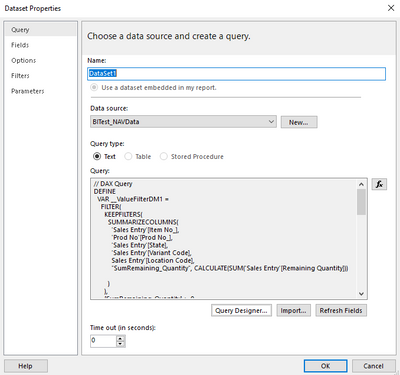
Thanks Stefano.  Please see below

KReynolds_0-1633537803877.png


// DAX Query

DEFINE

  VAR __ValueFilterDM1 =

    FILTER(

      KEEPFILTERS(

        SUMMARIZECOLUMNS(

          'Sales Entry'[Item No_],

          'Prod No'[Prod No_],

          'Sales Entry'[State],

          'Sales Entry'[Variant Code],

          Sales Entry'[Location Code],

          "SumRemaining_Quantity", CALCULATE(SUM('Sales Entry'[Remaining Quantity]))


        )

      ),

      [SumRemaining_Quantity] > 0

    )


  VAR __DS0Core =

    SUMMARIZECOLUMNS(

      ROLLUPADDISSUBTOTAL(

        ROLLUPGROUP(

          'Sales Entry'[Item No_],

          'Prod No'[Prod No_],

          'Sales Entry'[State],

          'Sales Entry'[Variant Code],

          'Sales Entry'[Location Code]

        ), "IsGrandTotalRowTotal"

      ),

      __ValueFilterDM1,

      "SumRemaining_Quantity", CALCULATE(SUM('Sales Entry'[Remaining Quantity]))


    )


  VAR __DS0PrimaryWindowed =

    TOPN(

      502,

      __DS0Core,

      [IsGrandTotalRowTotal],

      0,

      'Sales Entry'[Item No_],

      1,

      'Prod No'[Prod No_],

      1,

      'Sales Entry'[State],

      1,

      'Sales Entry'[Variant Code],

      1,

      'Sales Entry'[Location Code],

      1

    )


EVALUATE

  __DS0PrimaryWindowed


ORDER BY

  'Prod No'[Prod No_]

KReynolds_1-1633537907418.png


KReynolds_2-1633537967609.png


Hi there, I am facing this same issue. Did you ever find an answer to it?

Helpful resources

Announcements
April Power BI Update Carousel

Power BI Monthly Update - April 2026

Check out the April 2026 Power BI update to learn about new features.

New to Fabric survey Carousel

New to Fabric Survey

If you have recently started exploring Fabric, we'd love to hear how it's going. Your feedback can help with product improvements.

Power BI DataViz World Championships carousel

Power BI DataViz World Championships - June 2026

A new Power BI DataViz World Championship is coming this June! Don't miss out on submitting your entry.

FabCon and SQLCon Highlights Carousel

FabCon & SQLCon Highlights

Experience the highlights from FabCon & SQLCon, available live and on-demand starting April 14th.