
Join us at FabCon Atlanta from March 16 - 20, 2026, for the ultimate Fabric, Power BI, AI and SQL community-led event. Save $200 with code FABCOMM.
Register now!The Power BI Data Visualization World Championships is back! It's time to submit your entry. Live now!
I've connected a dataset from BI service and used BI Desktop report analyzer to create my dataset. When I try to create a parame ter using query designer I get this message: "Cannot find cube". An explaintion for what is going wron would be helpful.
you will need to share some more details, maybe the M code, screenshoots samples, the error code you getting etc, that help for people to be able to give a more exact response
Proud to be a Super User!
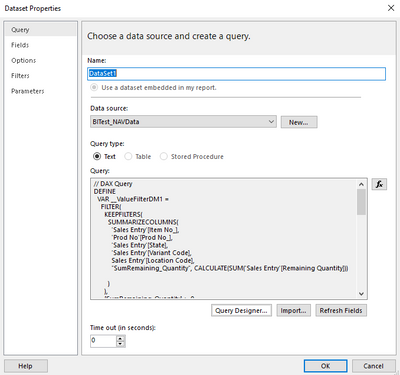
Thanks Stefano. Please see below
// DAX Query
DEFINE
VAR __ValueFilterDM1 =
FILTER(
KEEPFILTERS(
SUMMARIZECOLUMNS(
'Sales Entry'[Item No_],
'Prod No'[Prod No_],
'Sales Entry'[State],
'Sales Entry'[Variant Code],
Sales Entry'[Location Code],
"SumRemaining_Quantity", CALCULATE(SUM('Sales Entry'[Remaining Quantity]))
)
),
[SumRemaining_Quantity] > 0
)
VAR __DS0Core =
SUMMARIZECOLUMNS(
ROLLUPADDISSUBTOTAL(
ROLLUPGROUP(
'Sales Entry'[Item No_],
'Prod No'[Prod No_],
'Sales Entry'[State],
'Sales Entry'[Variant Code],
'Sales Entry'[Location Code]
), "IsGrandTotalRowTotal"
),
__ValueFilterDM1,
"SumRemaining_Quantity", CALCULATE(SUM('Sales Entry'[Remaining Quantity]))
)
VAR __DS0PrimaryWindowed =
TOPN(
502,
__DS0Core,
[IsGrandTotalRowTotal],
0,
'Sales Entry'[Item No_],
1,
'Prod No'[Prod No_],
1,
'Sales Entry'[State],
1,
'Sales Entry'[Variant Code],
1,
'Sales Entry'[Location Code],
1
)
EVALUATE
__DS0PrimaryWindowed
ORDER BY
'Prod No'[Prod No_]
Hi there, I am facing this same issue. Did you ever find an answer to it?