cancel
Showing results for 
Search instead for 
Did you mean: 

Vote for your favorite vizzies from the Power BI Dataviz World Championship submissions. Vote now!

Reply
Niraj_vora0106
Helper III
Helper III

Public View

Hi community,


I'm facing one issue while creating a Public view in Power BI Service.


After publishing the Dashboard in Workspace I'm trying to create Public view, I've admin rights too

Have enabled Publish to Web too. 

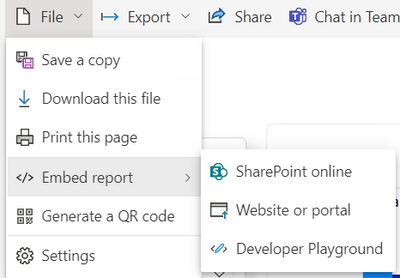
Still I'm not getting the option to create Public View.


below is the snip:

Niraj_vora0106_0-1678345884454.png


Nor I'm getting the the Report Name in Embed Codes list under Admin Portal.


Please help.


2 REPLIES 2
ibarrau
Super User
Super User

Hi. If you have the setting at the admin portal enabled then you just need to check Considerations and Limitations on the feature. You can read it here
https://learn.microsoft.com/en-us/power-bi/collaborate-share/service-publish-to-web#considerations-a...

Check if you are breaking something.

I hope that helps,


If this post helps, then please consider Accept it as the solution to help the other members find it more quickly.

Happy to help!

LaDataWeb Blog

hi @ibarrau 

I got the solution, I had applied RLS that's why Public view was not working!


Thanks for help!

Helpful resources

Announcements
Sticker Challenge 2026 Carousel

Join our Community Sticker Challenge 2026

If you love stickers, then you will definitely want to check out our Community Sticker Challenge!

January Power BI Update Carousel

Power BI Monthly Update - January 2026

Check out the January 2026 Power BI update to learn about new features.

FabCon Atlanta 2026 carousel

FabCon Atlanta 2026

Join us at FabCon Atlanta, March 16-20, for the ultimate Fabric, Power BI, AI and SQL community-led event. Save $200 with code FABCOMM.