This time we’re going bigger than ever. Fabric, Power BI, SQL, AI and more. We're covering it all. You won't want to miss it.
Learn moreDid you hear? There's a new SQL AI Developer certification (DP-800). Start preparing now and be one of the first to get certified. Register now
Hi community,
I'm facing one issue while creating a Public view in Power BI Service.
After publishing the Dashboard in Workspace I'm trying to create Public view, I've admin rights too
Have enabled Publish to Web too.
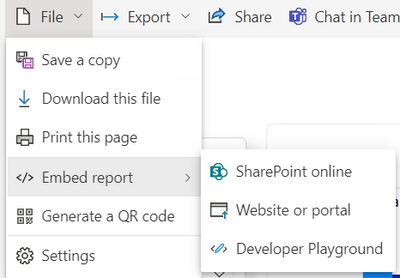
Still I'm not getting the option to create Public View.
below is the snip:
Nor I'm getting the the Report Name in Embed Codes list under Admin Portal.
Please help.
Hi. If you have the setting at the admin portal enabled then you just need to check Considerations and Limitations on the feature. You can read it here
https://learn.microsoft.com/en-us/power-bi/collaborate-share/service-publish-to-web#considerations-a...
Check if you are breaking something.
I hope that helps,
Happy to help!
hi @ibarrau
I got the solution, I had applied RLS that's why Public view was not working!
Thanks for help!
Check out the April 2026 Power BI update to learn about new features.
Sign up to receive a private message when registration opens and key events begin.
If you have recently started exploring Fabric, we'd love to hear how it's going. Your feedback can help with product improvements.
| User | Count |
|---|---|
| 10 | |
| 9 | |
| 8 | |
| 8 | |
| 7 |
| User | Count |
|---|---|
| 50 | |
| 27 | |
| 23 | |
| 22 | |
| 22 |