
cancel
Showing results for 
Search instead for 
Did you mean: 

Next up in the FabCon + SQLCon recap series: The roadmap for Microsoft SQL and Maximizing Developer experiences in Fabric. All sessions are available on-demand after the live show. Register now

Reply
Anonymous
Not applicable

Premium Capacity Workspace Storage

Hi 

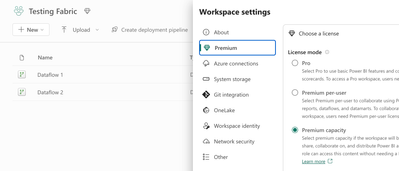
I have a Workspace in Premium Capacity as hown below

Screenshot 2024-03-01 at 12.46.15.png


Any idea why the storage is shown as 10GB? Is there any way to increase it for the workspace?

I guess we have 100TB storage for the Premium Capacity?


Screenshot 2024-03-01 at 12.48.39.png


Any helps is much appreciated.


Thanks

Deepak

7 REPLIES 7
Anonymous
Not applicable

Hi  @Anonymous ,


Thanks to @Anonymous for the reply!


I'd like to add  that: It may be that the workspace is not correctly assigned to the Premium capacity from the default workspace limit of 10GB that is displayed.
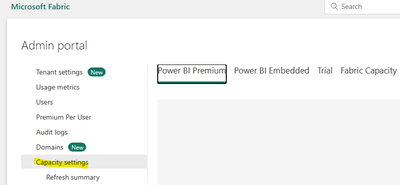
If you purchased the capacity node correctly, you can set the capacity in the Power BI Management Portal. You manage Power BI Premium capacity in the Capacity Settings section of the portal.

vkongfanfmsft_0-1709619519362.png


You can refer to below document:

Configure and manage capacities in Power BI Premium - Power BI | Microsoft Learn


Best Regards,
Adamk Kong


If this post helps, then please consider Accept it as the solution to help the other members find it more quickly.

Anonymous
Not applicable

Thanks for your reply Adamk,


Its not an issue of "assignment of workspaces  to Premiunm capacity" as all workpspaces in Premium capacity show this 10gb Limit. 

Yes, I am aware that the capacity can be managed from admin settings, but my question was regarding the management of storage for an individual workspace not the entire capacity.


Let me know if you can help


Thanks

Deepak

Anonymous
Not applicable

The limits on a workspace are dictated by the capacity (Pro vs PPU vs Premium vs Fabric)

Anonymous
Not applicable

Yes thought so, Thanks very much 😊

Anonymous
Not applicable

It is also a warning that you cannot upload a model larger than 10GB. That does not mean you are limited to 10GB models. Use parameters to limit the data in Power BI Desktop, then change the parameters in the Settings of the model and run a refresh.

Anonymous
Not applicable

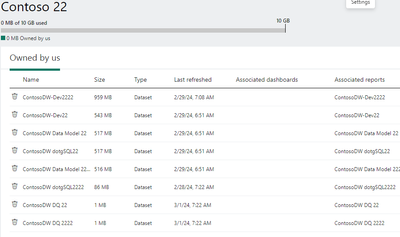
That is a label I see on many workspaces. It does not dictate the amount you can store. It was originally used for limits of Pro users, but it seems to show for all users. You at the image below and you can see I am using 3-4GBs of space, but it does not show up in the bar up top. This is a P1 capacity. Use Microsoft offical documentation for limits of your Premium capacity


3CloudThomas_0-1709300605970.png


Anonymous
Not applicable

Thanks very much for this....I did go through the Microsoft documentataion but couldnt find anything related to Storage for a particular workspace ...except that a capacity has 100TB limit. So may be there are no limits on an individual workspace? 

Helpful resources

Announcements
New to Fabric survey Carousel

New to Fabric Survey

If you have recently started exploring Fabric, we'd love to hear how it's going. Your feedback can help with product improvements.

Power BI DataViz World Championships carousel

Power BI DataViz World Championships - June 2026

A new Power BI DataViz World Championship is coming this June! Don't miss out on submitting your entry.

March Power BI Update Carousel

Power BI Community Update - March 2026

Check out the March 2026 Power BI update to learn about new features.