cancel
Showing results for 
Search instead for 
Did you mean: 

The Power BI Data Visualization World Championships is back! Get ahead of the game and start preparing now! Learn more

Reply
Anonymous
Not applicable

PowerPoint Export

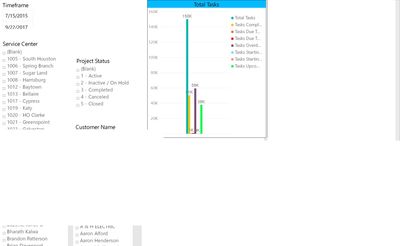
I am trying to export my report to power point via the Export to Powerpoint feature. The export itself is fine but once I download the powerpoint I am getting some blank boxes that covers the first page of the report where the data and charts are populated. Is there a workaround this issue because I tried republishing the report to the server and then downloading it and also saved the report published it to the service and then downloaded it but its all the same case in the end. Please let me know if there ia a solution for my issue. attached are couple of images stating the issue.


Thanks

Sridhar


Page 1.jpgPage 2.jpg

1 ACCEPTED SOLUTION
Anonymous
Not applicable

The issue has been resolved as I was using the custom page size instead of the default 16:9 size. So when I export it to powerpoint, the export would take screenshots of different portions of the page instead of screenshotting the entire page since its not the default page size. I also found out that Page 1 of the report should always be of the default size even when other pages in the report are of custom size.


View solution in original post

3 REPLIES 3
Anonymous
Not applicable

The issue has been resolved as I was using the custom page size instead of the default 16:9 size. So when I export it to powerpoint, the export would take screenshots of different portions of the page instead of screenshotting the entire page since its not the default page size. I also found out that Page 1 of the report should always be of the default size even when other pages in the report are of custom size.


Seth_C_Bauer
Community Champion
Community Champion

@Anonymous I've found better success with a 3rd party tool called Power Tiles -> Give that a shot.


Looking for more Power BI tips, tricks & tools? Check out PowerBI.tips the site I co-own with Mike Carlo. Also, if you are near SE WI? Join our PUG Milwaukee Brew City PUG
Anonymous
Not applicable

@Seth_C_Bauer Thank you for that suggestion. I will try the power tiles tool to see if the issue is fixed. I do have one problem though. The original issue was highlighted beacuse my end users want to export the report to powerpoint but were having these issues. They just want to click one option and download the entire report without any errors without installing another tool to fix the issue. Is there a way to do that? I did put in a issue ticket with microsoft to see if they have seen this bug. Please let me know if this issue can be resolved with any thrid party tools.


Thanks

Sridhar

Helpful resources

Announcements
Power BI DataViz World Championships

Power BI Dataviz World Championships

The Power BI Data Visualization World Championships is back! Get ahead of the game and start preparing now!

December 2025 Power BI Update Carousel

Power BI Monthly Update - December 2025

Check out the December 2025 Power BI Holiday Recap!

FabCon Atlanta 2026 carousel

FabCon Atlanta 2026

Join us at FabCon Atlanta, March 16-20, for the ultimate Fabric, Power BI, AI and SQL community-led event. Save $200 with code FABCOMM.