This time we’re going bigger than ever. Fabric, Power BI, SQL, AI and more. We're covering it all. You won't want to miss it.
Learn moreJoin the FabCon + SQLCon recap series. Up next: Power BI, Real-Time Intelligence, IQ and AI, and Data Factory take center stage. All sessions are available on-demand after the live show. Register now
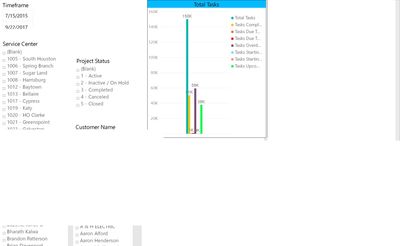
I am trying to export my report to power point via the Export to Powerpoint feature. The export itself is fine but once I download the powerpoint I am getting some blank boxes that covers the first page of the report where the data and charts are populated. Is there a workaround this issue because I tried republishing the report to the server and then downloading it and also saved the report published it to the service and then downloaded it but its all the same case in the end. Please let me know if there ia a solution for my issue. attached are couple of images stating the issue.
Thanks
Sridhar
Solved! Go to Solution.
The issue has been resolved as I was using the custom page size instead of the default 16:9 size. So when I export it to powerpoint, the export would take screenshots of different portions of the page instead of screenshotting the entire page since its not the default page size. I also found out that Page 1 of the report should always be of the default size even when other pages in the report are of custom size.
@Anonymous I've found better success with a 3rd party tool called Power Tiles -> Give that a shot.
@Anonymous Thank you for that suggestion. I will try the power tiles tool to see if the issue is fixed. I do have one problem though. The original issue was highlighted beacuse my end users want to export the report to powerpoint but were having these issues. They just want to click one option and download the entire report without any errors without installing another tool to fix the issue. Is there a way to do that? I did put in a issue ticket with microsoft to see if they have seen this bug. Please let me know if this issue can be resolved with any thrid party tools.
Thanks
Sridhar
Check out the April 2026 Power BI update to learn about new features.
If you have recently started exploring Fabric, we'd love to hear how it's going. Your feedback can help with product improvements.
A new Power BI DataViz World Championship is coming this June! Don't miss out on submitting your entry.
| User | Count |
|---|---|
| 11 | |
| 10 | |
| 9 | |
| 8 | |
| 7 |
| User | Count |
|---|---|
| 48 | |
| 34 | |
| 27 | |
| 21 | |
| 20 |