Join us at FabCon Atlanta from March 16 - 20, 2026, for the ultimate Fabric, Power BI, AI and SQL community-led event. Save $200 with code FABCOMM.
Register now!The Power BI Data Visualization World Championships is back! Get ahead of the game and start preparing now! Learn more
we have upgraded the PBI gateway with a newer version, after not able to connect the Flat file source getting 'PowerBiEntityFramework Exception error'
Solved! Go to Solution.
Hi @RXTurlak
Please check the vision for your gateway and framework .
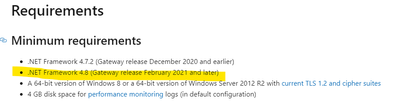
The latest version of gateway is 3000.79.6(April 2021) and the version of the framework is at least 4.8 .
You can check whether the environment where you install the gateway meets the requirements according to the link below .
https://docs.microsoft.com/en-us/data-integration/gateway/service-gateway-install
Best Regards
Community Support Team _ Ailsa Tao
If this post helps, then please consider Accept it as the solution to help the other members find it more quickly.
Hi @RXTurlak
Please check the vision for your gateway and framework .
The latest version of gateway is 3000.79.6(April 2021) and the version of the framework is at least 4.8 .
You can check whether the environment where you install the gateway meets the requirements according to the link below .
https://docs.microsoft.com/en-us/data-integration/gateway/service-gateway-install
Best Regards
Community Support Team _ Ailsa Tao
If this post helps, then please consider Accept it as the solution to help the other members find it more quickly.
Hi @RXTurlak
Sounds like you installed the 32bit version of the DOTNET framework
Can you make sure to install both the 32bit and 64bit versions of DOTNET Framework?
Hi @RXTurlak
Can you please make sure you have got the latest version of DOTNET Framework installed on your Gateway Server?
https://dotnet.microsoft.com/download/dotnet-framework/thank-you/net48-web-installer
Installed Latest .net Framework and upgraded PBI gateway newer version then after getting this issue.
PFB Log;
SYSTEM\CurrentControlSet\Control\SecurityProviders\SCHANNEL\Protocols\TLS 1.0\Client is not defined in registry.
SYSTEM\CurrentControlSet\Control\SecurityProviders\SCHANNEL\Protocols\TLS 1.1\Client is not defined in registry.
SYSTEM\CurrentControlSet\Control\SecurityProviders\SCHANNEL\Protocols\TLS 1.2\Client is not defined in registry.
And
SOFTWARE\WOW6432Node\Microsoft\.NETFramework\v4.0.30319 is not defined in registry.
The Power BI Data Visualization World Championships is back! Get ahead of the game and start preparing now!
| User | Count |
|---|---|
| 56 | |
| 55 | |
| 31 | |
| 18 | |
| 14 |