This time we’re going bigger than ever. Fabric, Power BI, SQL, AI and more. We're covering it all. You won't want to miss it.
Learn moreDid you hear? There's a new SQL AI Developer certification (DP-800). Start preparing now and be one of the first to get certified. Register now
we have upgraded the PBI gateway with a newer version, after not able to connect the Flat file source getting 'PowerBiEntityFramework Exception error'
Solved! Go to Solution.
Hi @RXTurlak
Please check the vision for your gateway and framework .
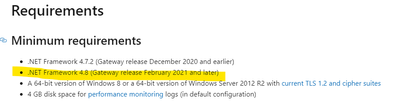
The latest version of gateway is 3000.79.6(April 2021) and the version of the framework is at least 4.8 .
You can check whether the environment where you install the gateway meets the requirements according to the link below .
https://docs.microsoft.com/en-us/data-integration/gateway/service-gateway-install
Best Regards
Community Support Team _ Ailsa Tao
If this post helps, then please consider Accept it as the solution to help the other members find it more quickly.
Hi @RXTurlak
Please check the vision for your gateway and framework .
The latest version of gateway is 3000.79.6(April 2021) and the version of the framework is at least 4.8 .
You can check whether the environment where you install the gateway meets the requirements according to the link below .
https://docs.microsoft.com/en-us/data-integration/gateway/service-gateway-install
Best Regards
Community Support Team _ Ailsa Tao
If this post helps, then please consider Accept it as the solution to help the other members find it more quickly.
Hi @RXTurlak
Sounds like you installed the 32bit version of the DOTNET framework
Can you make sure to install both the 32bit and 64bit versions of DOTNET Framework?
Hi @RXTurlak
Can you please make sure you have got the latest version of DOTNET Framework installed on your Gateway Server?
https://dotnet.microsoft.com/download/dotnet-framework/thank-you/net48-web-installer
Installed Latest .net Framework and upgraded PBI gateway newer version then after getting this issue.
PFB Log;
SYSTEM\CurrentControlSet\Control\SecurityProviders\SCHANNEL\Protocols\TLS 1.0\Client is not defined in registry.
SYSTEM\CurrentControlSet\Control\SecurityProviders\SCHANNEL\Protocols\TLS 1.1\Client is not defined in registry.
SYSTEM\CurrentControlSet\Control\SecurityProviders\SCHANNEL\Protocols\TLS 1.2\Client is not defined in registry.
And
SOFTWARE\WOW6432Node\Microsoft\.NETFramework\v4.0.30319 is not defined in registry.
Check out the April 2026 Power BI update to learn about new features.
Sign up to receive a private message when registration opens and key events begin.
If you have recently started exploring Fabric, we'd love to hear how it's going. Your feedback can help with product improvements.
| User | Count |
|---|---|
| 10 | |
| 8 | |
| 7 | |
| 7 | |
| 7 |
| User | Count |
|---|---|
| 49 | |
| 27 | |
| 21 | |
| 20 | |
| 20 |