Get certified for free when you join Fabric Data Days 2026 and dive into Fabric, Power BI, SQL, AI, and other essential data skills.
Join nowJuly 28 - August 9 | Final Round of the Power BI Dataviz World Championships. This is your chance. Learn more
I have the following code:
= Table.SelectRows(#"Accounts", each ([Year] >=Table.Buffer(Excel.CurrentWoorkbook(){[Name="Year"]}[Content])[Year]{0}) -it will refresh continuously and I need to stop it manually. But,
if I replace >= 2021 - it works. Any clue why is this happening? I don't want to hardcode 2021 instead I want to be read from excel table.
Solved! Go to Solution.
Hi, @emdluc_
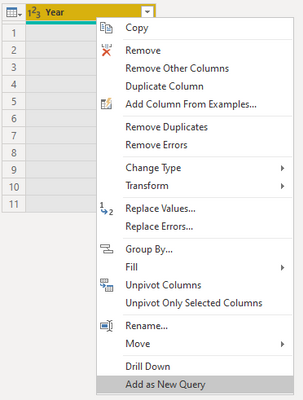
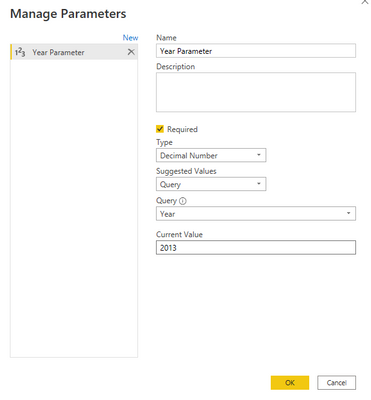
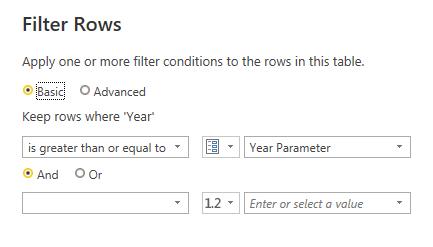
You can try the following methods.
Step1:
Step2:
Step3:
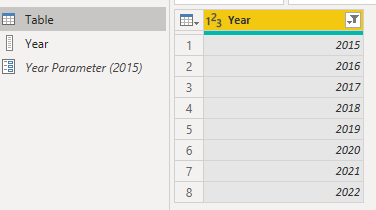
Result:
Change the year in the parameter and the table will be filtered.
Is this the result you expect?
Best Regards,
Community Support Team _Charlotte
If this post helps, then please consider Accept it as the solution to help the other members find it more quickly.
Hi, @emdluc_
Can you provide sample data for testing? Sensitive information can be removed in advance. What kind of expected results do you expect? You can also show it with pictures or Excel. I look forward to your response.
Best Regards,
Community Support Team _Charlotte
If this post helps, then please consider Accept it as the solution to help the other members find it more quickly.
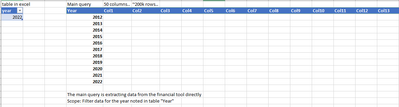
Hello,
Is this helpful enough?
Hi, @emdluc_
You can try the following methods.
Step1:
Step2:
Step3:
Result:
Change the year in the parameter and the table will be filtered.
Is this the result you expect?
Best Regards,
Community Support Team _Charlotte
If this post helps, then please consider Accept it as the solution to help the other members find it more quickly.
Join us in Barcelona for FabCon and SQLCon, the Fabric, Power BI, SQL, and AI community event. Save โฌ200 with code FABCMTY200.
If you love stickers, then you will definitely want to check out our community sticker challenge, Barcelona edition!
Check out the July 2026 Power BI update to learn about new features.