This is best Fabric, Power BI, SQL and AI community event. How do we know? The last event sold out! Save €200 with code FABCMTY200.
Register nowA new Data Days event is coming soon! This time we’re going bigger than ever. Fabric, Power BI, SQL, AI and more. Don't miss out.
I have the following code:
= Table.SelectRows(#"Accounts", each ([Year] >=Table.Buffer(Excel.CurrentWoorkbook(){[Name="Year"]}[Content])[Year]{0}) -it will refresh continuously and I need to stop it manually. But,
if I replace >= 2021 - it works. Any clue why is this happening? I don't want to hardcode 2021 instead I want to be read from excel table.
Solved! Go to Solution.
Hi, @emdluc_
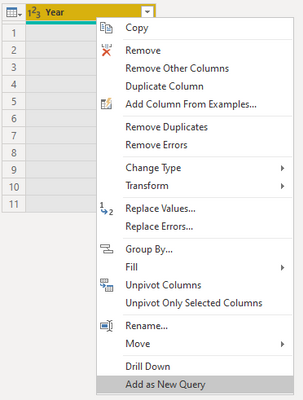
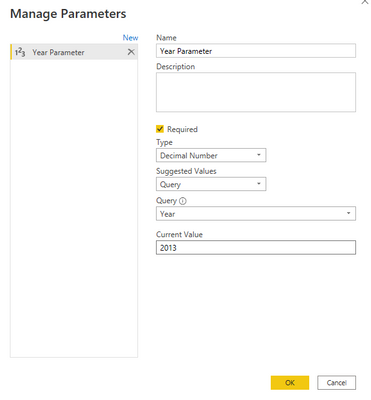
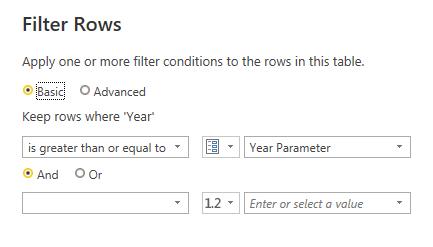
You can try the following methods.
Step1:
Step2:
Step3:
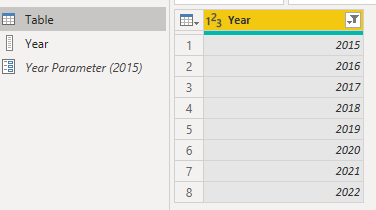
Result:
Change the year in the parameter and the table will be filtered.
Is this the result you expect?
Best Regards,
Community Support Team _Charlotte
If this post helps, then please consider Accept it as the solution to help the other members find it more quickly.
Hi, @emdluc_
Can you provide sample data for testing? Sensitive information can be removed in advance. What kind of expected results do you expect? You can also show it with pictures or Excel. I look forward to your response.
Best Regards,
Community Support Team _Charlotte
If this post helps, then please consider Accept it as the solution to help the other members find it more quickly.
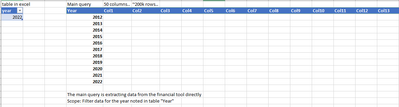
Hello,
Is this helpful enough?
Hi, @emdluc_
You can try the following methods.
Step1:
Step2:
Step3:
Result:
Change the year in the parameter and the table will be filtered.
Is this the result you expect?
Best Regards,
Community Support Team _Charlotte
If this post helps, then please consider Accept it as the solution to help the other members find it more quickly.
Check out the May 2026 Power BI update to learn about new features.
Sign up to receive a private message when registration opens and key events begin.
If you have recently started exploring Fabric, we'd love to hear how it's going. Your feedback can help with product improvements.
| User | Count |
|---|---|
| 11 | |
| 9 | |
| 7 | |
| 7 | |
| 6 |
| User | Count |
|---|---|
| 23 | |
| 22 | |
| 21 | |
| 19 | |
| 19 |