Get certified for free when you join Fabric Data Days 2026 and dive into Fabric, Power BI, SQL, AI, and other essential data skills.
Join nowJuly 28 - August 9 | Final Round of the Power BI Dataviz World Championships. This is your chance. Learn more
Hi!
I'm having trouble connecting to an Azure SQL Server database from Power BI. I have created a service account in Azure AD that has data_reader permissions in the database, which works well to connect to the database when I run SSMS. But when I test from Power BI Desktop or online it does not work. I've tried to enter the login information in both Windows and Microsoft Account.
If I try to use an SQL account and the option "database" authentication it works locally, but I need to share my report/dataset online and setup an automatic refresh of the dataset.
/Jonas
Solved! Go to Solution.
Hi @Ncedia ,
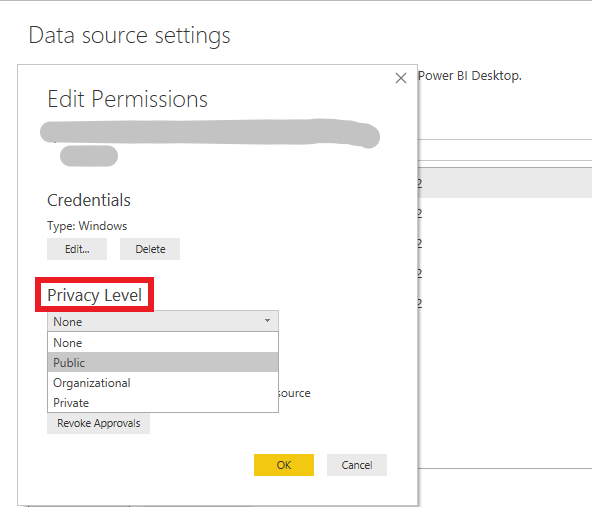
Please check if the privacy level in Desktop matches in Service. And if it is private, please change to public to have a try.
Best Regards,
Xue Ding
If this post helps, then please consider Accept it as the solution to help the other members find it more quickly.
Hi @Ncedia ,
Please check if the privacy level in Desktop matches in Service. And if it is private, please change to public to have a try.
Best Regards,
Xue Ding
If this post helps, then please consider Accept it as the solution to help the other members find it more quickly.
If you love stickers, then you will definitely want to check out our community sticker challenge, Barcelona edition!
Check out the July 2026 Power BI update to learn about new features.
| User | Count |
|---|---|
| 10 | |
| 9 | |
| 9 | |
| 7 | |
| 5 |