Get Fabric or SQL Certified for Free.
Get certified for free when you join Fabric Data Days 2026 and dive into Fabric, Power BI, SQL, AI, and other essential data skills.
Join now- Power BI forums
- Get Help with Power BI
- Desktop
- Service
- Report Server
- Power Query
- Mobile Apps
- Developer
- DAX Commands and Tips
- Custom Visuals Development Discussion
- Health and Life Sciences
- Power BI Spanish forums
- Translated Spanish Desktop
- Training and Consulting
- Instructor Led Training
- Dashboard in a Day for Women, by Women
- Galleries
- Data Stories Gallery
- Themes Gallery
- Contests Gallery
- QuickViz Gallery
- Quick Measures Gallery
- Visual Calculations Gallery
- Fabric Apps Gallery
- Notebook Gallery
- Translytical Task Flow Gallery
- TMDL Gallery
- R Script Showcase
- Webinars and Video Gallery
- Ideas
- Custom Visuals Ideas (read-only)
- Issues
- Issues
- Events
- Upcoming Events
July 7 - July 17 | Round 2 of the Power BI Dataviz World Championships. Don't miss your chance! Learn more
- Power BI forums
- Forums
- Get Help with Power BI
- Service
- Re: Power BI Service Dataset changing
- Subscribe to RSS Feed
- Mark Topic as New
- Mark Topic as Read
- Float this Topic for Current User
- Bookmark
- Subscribe
- Printer Friendly Page


- Mark as New
- Bookmark
- Subscribe
- Mute
- Subscribe to RSS Feed
- Permalink
- Report Inappropriate Content
Power BI Service Dataset changing
Hi
I have Power BI Dataset. I am trying to create multiple reports (/content) using the same Power BI Dataset.
I create the report and when I upload it is creating a new dataset.
Wondering if there is something I am doing wrong or a way to fix this.
Steps:
a) "MyCompany - ProjectApp - Data Model" is the dataset name, click the three dots and click report
b) create or drag something and save the report "Report 1 aaa"
c) Go back to the content page of your workspace, open, download the .pbix file
d) do the changes the pbix file and upload the pbix file (... allow to overwrite)
e) In the dataset, you will see new dataset, which is not my intention. I want to use the same dataset.
Question: How to keep the same dataset for all the reports? (Before I had not this issue, seeing this lately)
Thanks in advance
Solved! Go to Solution.
- Mark as New
- Bookmark
- Subscribe
- Mute
- Subscribe to RSS Feed
- Permalink
- Report Inappropriate Content
B) Power BI Service - Dataset - Power BI report
For those interested, I guess some thing is wrong with my original steps.
I followed this way, and got it resolved.
https://www.kasperonbi.com/how-to-point-existing-reports-to-a-new-dataset-in-power-bi-even-from-aas/
Steps I did to resolved this issue
a) Create a new blank report using Power BI Desktop
b) Sign in
c) Connect to the power BI Dataset of your workspace
d) Open the old file, copy all CTRL + A and paste into new one in each page.
note: page level and report level filters, you have to manually create
e) save the file
f) publish back to the workspace
e) verified the lineage to make sure the dataset used is correct.
🙂

- Mark as New
- Bookmark
- Subscribe
- Mute
- Subscribe to RSS Feed
- Permalink
- Report Inappropriate Content
I think as long is it is in the same app workspace it will use the same dataset.
When in another app workspace it will appear to be a different dataset, but underlying it is still the same.
- Mark as New
- Bookmark
- Subscribe
- Mute
- Subscribe to RSS Feed
- Permalink
- Report Inappropriate Content
Hi
Thanks for the reply. It is in the same workspace.
Is there a way, we can change or know which dataset the following uses using the browser?
a) Power BI Service - Dataset - Power BI Report
b) Power BI Service - Dataset - Paginated Report
Say, in paginated report, I can download and check the code, but nothing in Browser.
<DataSource Name="....">
      <rd:SecurityType>None</rd:SecurityType>
      <ConnectionProperties>
        <DataProvider>PBIDATASET</DataProvider>
        <ConnectString>Data Source=pbiazure://.../;Identity Provider="https://login.microsoftonline.com/common, https://.../powerbi/api, ... GUID ...";Initial Catalog=...;Integrated Security=ClaimsToken</ConnectString>
      </ConnectionProperties>
      <rd:DataSourceID>... GUID ... </rd:DataSourceID>
      <rd:PowerBIWorkspaceName>...</rd:PowerBIWorkspaceName>
      <rd:PowerBIDatasetName>...</rd:PowerBIDatasetName>
    </DataSource>
Thanks
- Mark as New
- Bookmark
- Subscribe
- Mute
- Subscribe to RSS Feed
- Permalink
- Report Inappropriate Content
B) Power BI Service - Dataset - Power BI report
For those interested, I guess some thing is wrong with my original steps.
I followed this way, and got it resolved.
https://www.kasperonbi.com/how-to-point-existing-reports-to-a-new-dataset-in-power-bi-even-from-aas/
Steps I did to resolved this issue
a) Create a new blank report using Power BI Desktop
b) Sign in
c) Connect to the power BI Dataset of your workspace
d) Open the old file, copy all CTRL + A and paste into new one in each page.
note: page level and report level filters, you have to manually create
e) save the file
f) publish back to the workspace
e) verified the lineage to make sure the dataset used is correct.
🙂


- Mark as New
- Bookmark
- Subscribe
- Mute
- Subscribe to RSS Feed
- Permalink
- Report Inappropriate Content
And bookmarks, and interactions between elements...etc. For many reports, this is a very dangerous approach, but indeed, for simple reports it can work.
- Mark as New
- Bookmark
- Subscribe
- Mute
- Subscribe to RSS Feed
- Permalink
- Report Inappropriate Content
Hi @sevenhills ,
Thanks a lot for sharing your solution. It will help others in the community find the solution easily if they face the similar problem with you.
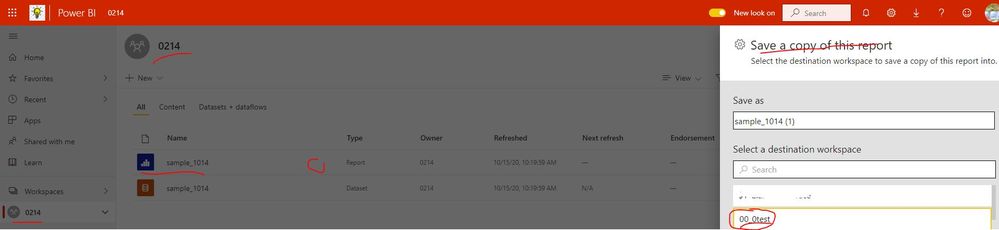
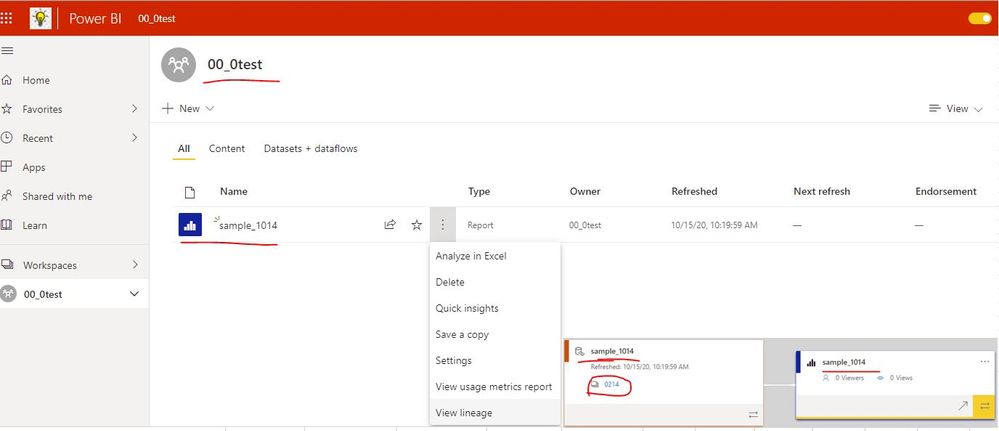
In addition, please check whether the below method also can satisfy your requirement. For example, copy the report sample_1014 in workspace 0214 into workspace "00_0test"
1. Save a copy of a report in a workspace
2. Navigate to the destination workspace and find the copied report, click "..." icon and select "View lineage"
Best Regards
Community Support Team _ Rena Ruan
If this post helps, then please consider Accept it as the solution to help the other members find it more.
- Mark as New
- Bookmark
- Subscribe
- Mute
- Subscribe to RSS Feed
- Permalink
- Report Inappropriate Content
Hi @Anonymous / Rena
My issue was within the same workspace.
FYI, I always like to use Data lineage to verify the report and its dataset.
Thanks for providing the details
Thanks
- Mark as New
- Bookmark
- Subscribe
- Mute
- Subscribe to RSS Feed
- Permalink
- Report Inappropriate Content
Hi @sevenhills ,
Thanks for your information. Sorry that I just misunderstand your requirement... Could you please mark your post as Answered? Thank you.
Best Regards
Rena

Helpful resources

FabCon & SQLCon – Barcelona 2026
Join us in Barcelona for FabCon and SQLCon, the Fabric, Power BI, SQL, and AI community event. Save €200 with code FABCMTY200.

Fabric Community Sticker Challenge - Barcelona 2026
If you love stickers, then you will definitely want to check out our community sticker challenge, Barcelona edition!

Power BI Monthly Update - July 2026
Check out the July 2026 Power BI update to learn about new features.

Power BI DataViz World Championships - June 2026
A new Power BI DataViz World Championship is coming this June! Don't miss out on submitting your entry.

| User | Count |
|---|---|
| 17 | |
| 7 | |
| 6 | |
| 6 | |
| 5 |


