This is best Fabric, Power BI, SQL and AI community event. How do we know? The last event sold out! Save €200 with code FABCMTY200.
Register nowThe Fabric community is upgrading! Read all of the details including the timeline and what you can expect. Learn more
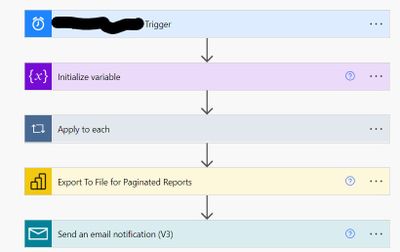
hi, I have a paginated report with a single parameter " Region". And I have created a Flow in Power Automate for the user subscription which looks like this
Now I had to add another parameter City in the paginated report. This flow stopped working.
Do I need to insert another "Apply to each" step for the second parameter? Or I can add another ser of the code Name: and Value: right below the Region Code?
Thanks
Solved! Go to Solution.
HI @BishwaR ,
Pls refer the following link:
https://powerusers.microsoft.com/t5/Get-Help-with-Power-Automate/ct-p/FL_GeneralDiscussions
Best Regards
Lucien
Hi @BishwaR ,
I also suggest you to create a post in power automate forum. And in power bi you should set Allow multiple values property for the parameter:https://docs.microsoft.com/en-us/power-bi/report-builder-parameters#bkmk_Report_Parameters
And if you need to Pass a report parameter in a URL , The format for a multi-value parameter is to repeat the parameter name for each value. please refer to the example in this document: https://docs.microsoft.com/en-us/power-bi/report-builder-url-pass-parameters#additional-examples
You also could check if the following article is helpful:
Best Regards
Lucien
Thank you so much. Could you please give me the link to Power Automate forum?
HI @BishwaR ,
Pls refer the following link:
https://powerusers.microsoft.com/t5/Get-Help-with-Power-Automate/ct-p/FL_GeneralDiscussions
Best Regards
Lucien
Join us in Barcelona for FabCon and SQLCon, the Fabric, Power BI, SQL, and AI community event. Save €200 with code FABCMTY200.
| User | Count |
|---|---|
| 13 | |
| 11 | |
| 9 | |
| 6 | |
| 5 |