cancel
Showing results for 
Search instead for 
Did you mean: 

Join the FabCon + SQLCon recap series. Up next: Power BI, Real-Time Intelligence, IQ and AI, and Data Factory take center stage. All sessions are available on-demand after the live show. Register now

Reply
bergerlu
Helper I
Helper I

PBI Embedded Capacity SSMS error

Hello,


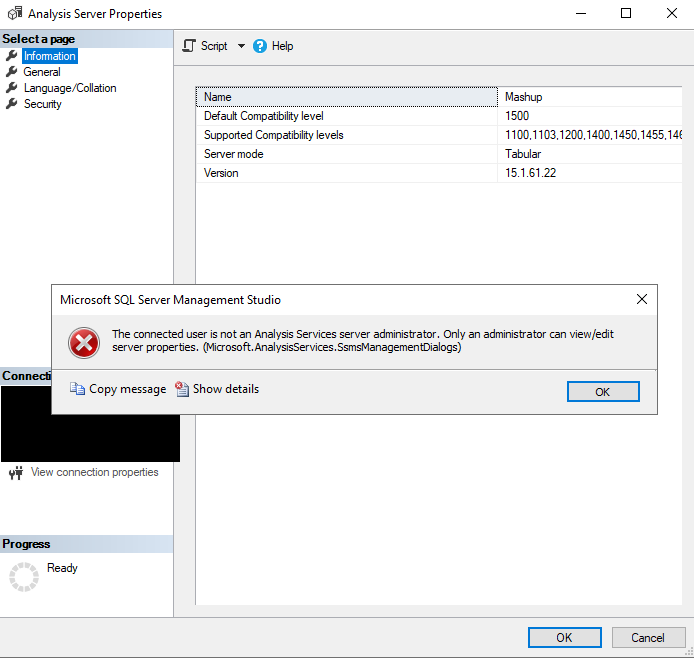
I'm connected to my PBI Embedded Capacity via SSMS. When I right click on the analysis service and go to properties -> general, I get this error. I am the owner and administrator of the capacity. What gives ?


embed_error.png


===================================

The connected user is not an Analysis Services server administrator. Only an administrator can view/edit server properties. (Microsoft.AnalysisServices.SsmsManagementDialogs)

------------------------------
Program Location:

at Microsoft.AnalysisServices.ManagementDialogs.CUtils.GetServerAsAdmin(IExDataContainer context)
at Microsoft.AnalysisServices.ManagementDialogs.ServerPropertiesGeneralPanel.InitProp()
at Microsoft.AnalysisServices.ManagementDialogs.ServerPropertiesGeneralPanel.OnInitialization()
at Microsoft.SqlServer.Management.SqlMgmt.ExPanelFormWrapper.OnInitialization()
at Microsoft.SqlServer.Management.SqlMgmt.ViewSwitcherControlsManager.SetView(Int32 index, TreeNode node)
at Microsoft.SqlServer.Management.SqlMgmt.ViewSwitcherControlsManager.OnBeforeSelection(Object sender, TreeViewCancelEventArgs e)


5 REPLIES 5
Anonymous
Not applicable

Hi @bergerlu ,

According to the error message, it seems that the error caused by you are not the administrator of Analysis Services... How did you connect to Analysis Services? And did you enable XMLA read-write and Export data feature?

Connect with SSMS

Best Regards
Community Support Team _ Rena Ruan
If this post helps, then please consider Accept it as the solution to help the other members find it more.

Hi, @Anonymous 


Anonymous
Not applicable

Hi @bergerlu ,

Could you please check whether follow the process in the following link when you connect to Analysis Services? As checked the screenshot in previous post, it display the server name is "Mashup"....

Connect with SSMS

server name.JPG

Best Regards
Community Support Team _ Rena Ruan
If this post helps, then please consider Accept it as the solution to help the other members find it more.

@Anonymous Ok I tried to switch to the Active Directory - Universal with MFA authentication but at the end I still have the same error.


To be clear, I am using a Power BI Embedded Capacity and the workspace associated to it is named Mashup.

Anonymous
Not applicable

Hi @bergerlu ,

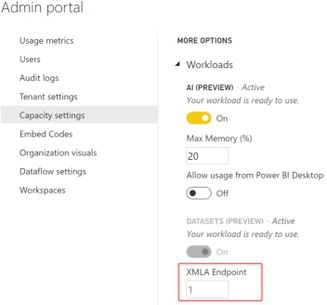
Whether you enable the XMLA Endpoint option in Admin portal?

XMLA Endpoint.JPG

Security requirements

What Is the XMLA Endpoint for Power BI and Why Should I Care?

Best Regards

Helpful resources

Announcements
April Power BI Update Carousel

Power BI Monthly Update - April 2026

Check out the April 2026 Power BI update to learn about new features.

New to Fabric survey Carousel

New to Fabric Survey

If you have recently started exploring Fabric, we'd love to hear how it's going. Your feedback can help with product improvements.

Power BI DataViz World Championships carousel

Power BI DataViz World Championships - June 2026

A new Power BI DataViz World Championship is coming this June! Don't miss out on submitting your entry.

FabCon and SQLCon Highlights Carousel

FabCon &SQLCon Highlights

Experience the highlights from FabCon & SQLCon, available live and on-demand starting April 14th.