Get certified for free when you join Fabric Data Days 2026 and dive into Fabric, Power BI, SQL, AI, and other essential data skills.
Join nowJuly 7 - July 17 | Round 2 of the Power BI Dataviz World Championships. Don't miss your chance! Learn more
Hello,
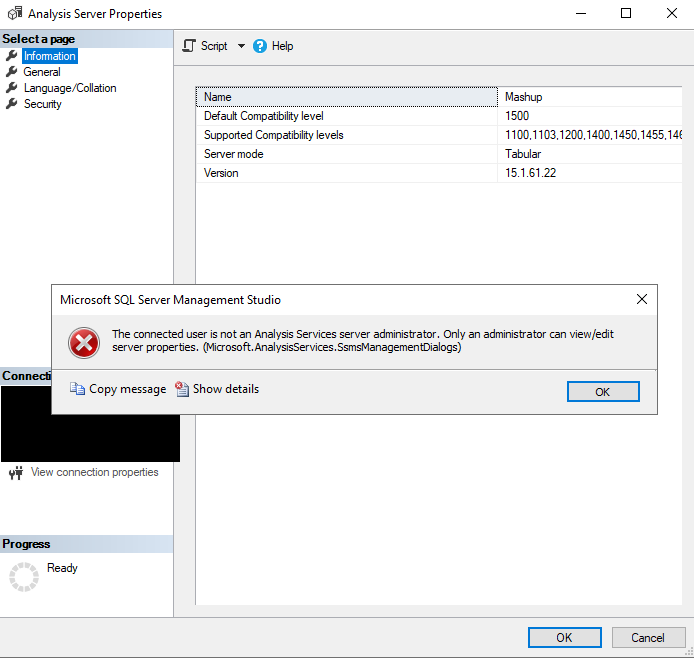
I'm connected to my PBI Embedded Capacity via SSMS. When I right click on the analysis service and go to properties -> general, I get this error. I am the owner and administrator of the capacity. What gives ?
===================================
The connected user is not an Analysis Services server administrator. Only an administrator can view/edit server properties. (Microsoft.AnalysisServices.SsmsManagementDialogs)
------------------------------
Program Location:
at Microsoft.AnalysisServices.ManagementDialogs.CUtils.GetServerAsAdmin(IExDataContainer context)
at Microsoft.AnalysisServices.ManagementDialogs.ServerPropertiesGeneralPanel.InitProp()
at Microsoft.AnalysisServices.ManagementDialogs.ServerPropertiesGeneralPanel.OnInitialization()
at Microsoft.SqlServer.Management.SqlMgmt.ExPanelFormWrapper.OnInitialization()
at Microsoft.SqlServer.Management.SqlMgmt.ViewSwitcherControlsManager.SetView(Int32 index, TreeNode node)
at Microsoft.SqlServer.Management.SqlMgmt.ViewSwitcherControlsManager.OnBeforeSelection(Object sender, TreeViewCancelEventArgs e)
Hi @bergerlu ,
According to the error message, it seems that the error caused by you are not the administrator of Analysis Services... How did you connect to Analysis Services? And did you enable XMLA read-write and Export data feature?
Best Regards
Community Support Team _ Rena Ruan
If this post helps, then please consider Accept it as the solution to help the other members find it more.
Hi, @Anonymous
Yes, I am the Power BI Embedded Capacity owner and administrator. XMLA read-write is enabled. Export data is enabled for the entire organization ...
Hi @bergerlu ,
Could you please check whether follow the process in the following link when you connect to Analysis Services? As checked the screenshot in previous post, it display the server name is "Mashup"....
Best Regards
Community Support Team _ Rena Ruan
If this post helps, then please consider Accept it as the solution to help the other members find it more.
@Anonymous Ok I tried to switch to the Active Directory - Universal with MFA authentication but at the end I still have the same error.
To be clear, I am using a Power BI Embedded Capacity and the workspace associated to it is named Mashup.
Hi @bergerlu ,
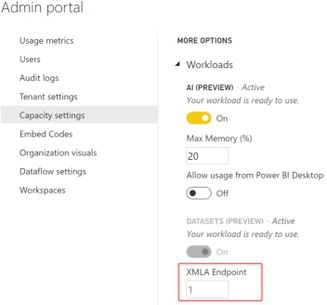
Whether you enable the XMLA Endpoint option in Admin portal?
What Is the XMLA Endpoint for Power BI and Why Should I Care?
Best Regards
Join us in Barcelona for FabCon and SQLCon, the Fabric, Power BI, SQL, and AI community event. Save €200 with code FABCMTY200.
Join Fabric Data Days 2026: 60 days of free live/on-demand sessions, challenges, study groups, and certification opportunities.
| User | Count |
|---|---|
| 16 | |
| 14 | |
| 9 | |
| 8 | |
| 8 |
| User | Count |
|---|---|
| 32 | |
| 29 | |
| 27 | |
| 25 | |
| 25 |