cancel
Showing results for 
Search instead for 
Did you mean: 

The Power BI Data Visualization World Championships is back! Get ahead of the game and start preparing now! Learn more

Reply
sabhishek
Frequent Visitor

Need Help On Power Query Code

Can somebody help me with the Power Query code by which I can update the value for Column Spend for against ProductTitle Diff whose formula is Base = 1 – SUM(Spend). Data may increase and pattern is shown below. The source is SharePoint list. I will have to show this data on Donut chart in Power BI.


Spend   ReportDate    ProductTitle                  Spend       ReportDate    ProductTitle
0.3        5/4/2016      A                                    0.3          5/4/2016        A
0.53      5/4/2016      B                                    0.53        5/4/2016        B
             5/4/2016     Base                                0.17        5/4/2016       Base

Spend     ReportDate   ProductTitle                 Spend     ReportDate      ProductTitle
0.3          5/4/2016      A                                 0.3          5/4/2016         A
0.53        5/4/2016      B                                 0.53        5/4/2016         B
               5/4/2016    Base                              0.17        5/4/2016        Base
0.5          6/5/2016    A                                   0.5          6/5/2016        A
0.38        6/5/2016    B                                   0.38        6/5/2016        B
               6/5/2016    Base                              0.12        6/5/2016        Base


1 ACCEPTED SOLUTION
Habib
Continued Contributor

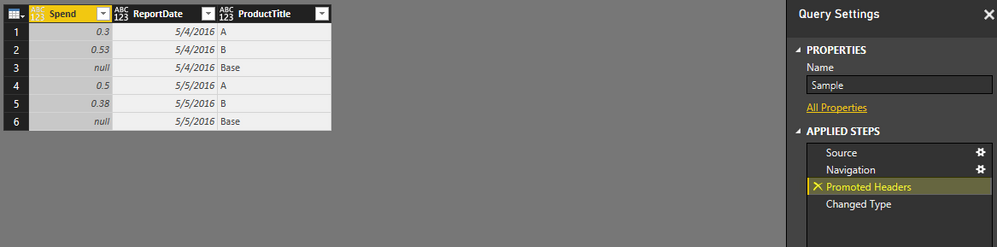
Here are the detailed steps for achieving this. I am asuming that your Product title has same pattren.


I have used below sample data in excel


stepq.png

Connected with Excel and edit the query


step2.png

After this remove the two steps from right area "Chagne Type" and Promoted Headers". It will bring your column hearders as data row. Now remove first row by going to Home Table and clicking Remove Rows button. You need to mention 1 as number of rows to be deleted.


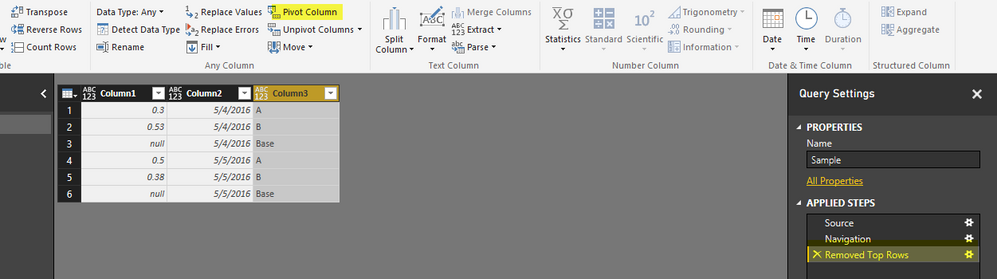
Now your data set will look like this.


step3.png

Now select Column3 and click on Pivot Column button under Transformations Tab


step4.png

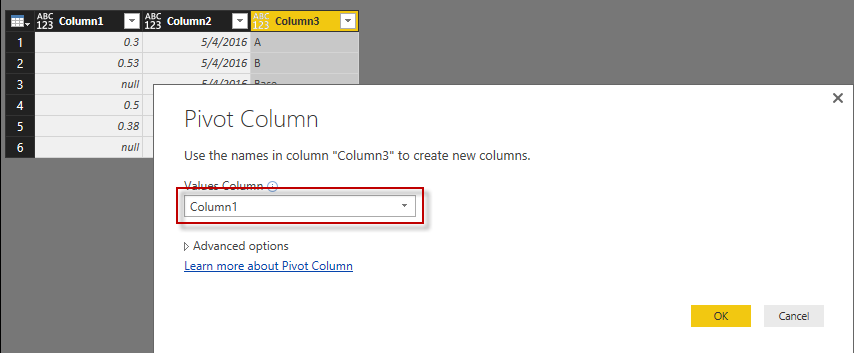
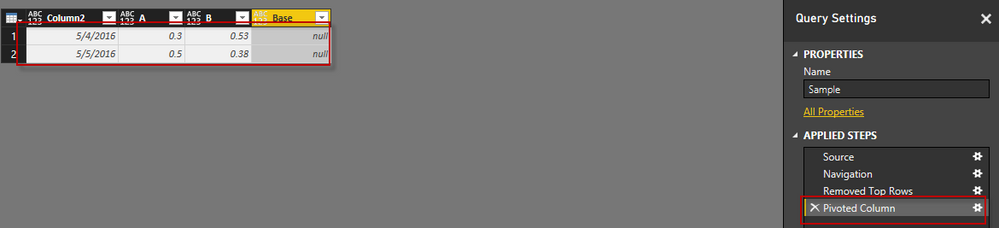
select Column1 as Value column in popup and click Ok. It will pivot your data to a new format as below


step5.png

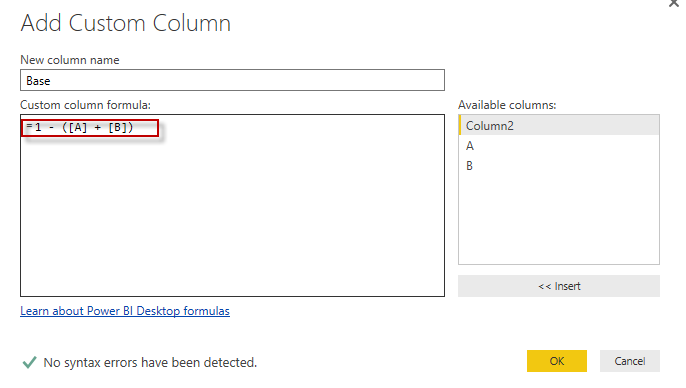
Now remove the Base Column and Add new Column Base with Below Formula


step6.png

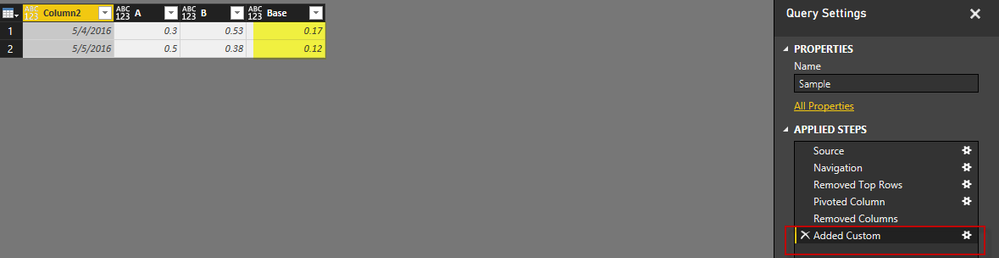
You base value has been calculated. See below for reference


step7.png

View solution in original post

2 REPLIES 2
Habib
Continued Contributor

Here are the detailed steps for achieving this. I am asuming that your Product title has same pattren.


I have used below sample data in excel


stepq.png

Connected with Excel and edit the query


step2.png

After this remove the two steps from right area "Chagne Type" and Promoted Headers". It will bring your column hearders as data row. Now remove first row by going to Home Table and clicking Remove Rows button. You need to mention 1 as number of rows to be deleted.


Now your data set will look like this.


step3.png

Now select Column3 and click on Pivot Column button under Transformations Tab


step4.png

select Column1 as Value column in popup and click Ok. It will pivot your data to a new format as below


step5.png

Now remove the Base Column and Add new Column Base with Below Formula


step6.png

You base value has been calculated. See below for reference


step7.png

Thank You so much Habib for your time and support. This solution has helped me to complete my task. Thanks again...Smiley Happy

Helpful resources

Announcements
Power BI DataViz World Championships

Power BI Dataviz World Championships

The Power BI Data Visualization World Championships is back! Get ahead of the game and start preparing now!

December 2025 Power BI Update Carousel

Power BI Monthly Update - December 2025

Check out the December 2025 Power BI Holiday Recap!

FabCon Atlanta 2026 carousel

FabCon Atlanta 2026

Join us at FabCon Atlanta, March 16-20, for the ultimate Fabric, Power BI, AI and SQL community-led event. Save $200 with code FABCOMM.