cancel
Showing results for 
Search instead for 
Did you mean: 

July 28 - August 9 | Final Round of the Power BI Dataviz World Championships. This is your chance. Learn more

Reply
manideep547
Helper III
Helper III

NUMBER OF VISITS

BELOW IS MY DATA
ID       DATE        DESTINATION           
111      1/12/2019   DESTINATION1               
222      02/12/2019  DESTINATION2              
222      03/12/2019  DESTINATION1              

I Need a number of visits to count  If the same customer is visiting the same destination again on the same day then consider the number of visits to that customer is one.
Number of visits =3
number of visits in destination1 =2
number of visits in destination2 =1

NOTE:  My dataset is very large nearly 54M rows are there.


1 ACCEPTED SOLUTION
az38
Community Champion
Community Champion

Hi @manideep547 

it is exactly thread for Desktop https://community.powerbi.com/t5/Desktop/bd-p/power-bi-designer or DAX https://community.powerbi.com/t5/DAX-Commands-and-Tips/bd-p/DAXCommands forums, but try the next technique


First, create a calculated table

Table 2 = 
SUMMARIZE('Table','Table'[DESTINATION],'Table'[DATE],'Table'[ID],"N visits",COUNTROWS('Table'))

or you can do the same in the Power Query Editor mode using Group By functionality

Second, creare a measure in your table

Measure = 
CALCULATE(COUNT('Table 2'[ID]),ALLEXCEPT('Table 2','Table 2'[DESTINATION]))

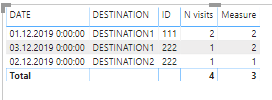
and you will be able to get desired output

Снимок.PNG 


do not hesitate to give a kudo to useful posts and mark solutions as solution
LinkedIn

View solution in original post

3 REPLIES 3
az38
Community Champion
Community Champion

Hi @manideep547 

it is exactly thread for Desktop https://community.powerbi.com/t5/Desktop/bd-p/power-bi-designer or DAX https://community.powerbi.com/t5/DAX-Commands-and-Tips/bd-p/DAXCommands forums, but try the next technique


First, create a calculated table

Table 2 = 
SUMMARIZE('Table','Table'[DESTINATION],'Table'[DATE],'Table'[ID],"N visits",COUNTROWS('Table'))

or you can do the same in the Power Query Editor mode using Group By functionality

Second, creare a measure in your table

Measure = 
CALCULATE(COUNT('Table 2'[ID]),ALLEXCEPT('Table 2','Table 2'[DESTINATION]))

and you will be able to get desired output

Снимок.PNG 


do not hesitate to give a kudo to useful posts and mark solutions as solution
LinkedIn

@az38  can you please attach the .pdix file and Thank you for your reply.

az38
Community Champion
Community Champion

@manideep547 

try here 

https://ufile.io/8roxj9tj

do not hesitate to give a kudo to useful posts and mark solutions as solution
LinkedIn

Helpful resources

Announcements
Fabric Community Sticker Design Challenge Barcelona Carousel

Fabric Community Sticker Challenge - Barcelona 2026

If you love stickers, then you will definitely want to check out our community sticker challenge, Barcelona edition!

July Power BI Update Carousel

Power BI Monthly Update - July 2026

Check out the July 2026 Power BI update to learn about new features.

Power BI DataViz World Championships carousel

Power BI DataViz World Championships - June 2026

A new Power BI DataViz World Championship is coming this June! Don't miss out on submitting your entry.

Top Kudoed Authors