cancel
Showing results for 
Search instead for 
Did you mean: 

The Power BI Data Visualization World Championships is back! Get ahead of the game and start preparing now! Learn more

Reply
manideep547
Helper III
Helper III

NUMBER OF VISITS

BELOW IS MY DATA
ID       DATE        DESTINATION           
111      1/12/2019   DESTINATION1               
222      02/12/2019  DESTINATION2              
222      03/12/2019  DESTINATION1              

I Need a number of visits to count  If the same customer is visiting the same destination again on the same day then consider the number of visits to that customer is one.
Number of visits =3
number of visits in destination1 =2
number of visits in destination2 =1

NOTE:  My dataset is very large nearly 54M rows are there.


1 ACCEPTED SOLUTION
az38
Community Champion
Community Champion

Hi @manideep547 

it is exactly thread for Desktop https://community.powerbi.com/t5/Desktop/bd-p/power-bi-designer or DAX https://community.powerbi.com/t5/DAX-Commands-and-Tips/bd-p/DAXCommands forums, but try the next technique


First, create a calculated table

Table 2 = 
SUMMARIZE('Table','Table'[DESTINATION],'Table'[DATE],'Table'[ID],"N visits",COUNTROWS('Table'))

or you can do the same in the Power Query Editor mode using Group By functionality

Second, creare a measure in your table

Measure = 
CALCULATE(COUNT('Table 2'[ID]),ALLEXCEPT('Table 2','Table 2'[DESTINATION]))

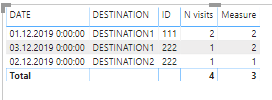
and you will be able to get desired output

Снимок.PNG 


do not hesitate to give a kudo to useful posts and mark solutions as solution
LinkedIn

View solution in original post

3 REPLIES 3
az38
Community Champion
Community Champion

Hi @manideep547 

it is exactly thread for Desktop https://community.powerbi.com/t5/Desktop/bd-p/power-bi-designer or DAX https://community.powerbi.com/t5/DAX-Commands-and-Tips/bd-p/DAXCommands forums, but try the next technique


First, create a calculated table

Table 2 = 
SUMMARIZE('Table','Table'[DESTINATION],'Table'[DATE],'Table'[ID],"N visits",COUNTROWS('Table'))

or you can do the same in the Power Query Editor mode using Group By functionality

Second, creare a measure in your table

Measure = 
CALCULATE(COUNT('Table 2'[ID]),ALLEXCEPT('Table 2','Table 2'[DESTINATION]))

and you will be able to get desired output

Снимок.PNG 


do not hesitate to give a kudo to useful posts and mark solutions as solution
LinkedIn

@az38  can you please attach the .pdix file and Thank you for your reply.

az38
Community Champion
Community Champion

@manideep547 

try here 

https://ufile.io/8roxj9tj

do not hesitate to give a kudo to useful posts and mark solutions as solution
LinkedIn

Helpful resources

Announcements
Power BI DataViz World Championships

Power BI Dataviz World Championships

The Power BI Data Visualization World Championships is back! Get ahead of the game and start preparing now!

December 2025 Power BI Update Carousel

Power BI Monthly Update - December 2025

Check out the December 2025 Power BI Holiday Recap!

FabCon Atlanta 2026 carousel

FabCon Atlanta 2026

Join us at FabCon Atlanta, March 16-20, for the ultimate Fabric, Power BI, AI and SQL community-led event. Save $200 with code FABCOMM.