Don't miss your chance to take the Fabric Data Engineer (DP-600) exam for FREE! Find out how by watching the DP-600 session on-demand now through April 28th.
Learn moreJoin the FabCon + SQLCon recap series. Up next: Power BI, Real-Time Intelligence, IQ and AI, and Data Factory take center stage. All sessions are available on-demand after the live show. Register now
BELOW IS MY DATA
ID DATE DESTINATION 111 1/12/2019 DESTINATION1 111 1/12/2019 DESTINATION1 222 02/12/2019 DESTINATION2 222 03/12/2019 DESTINATION1
I Need a number of visits to count If the same customer is visiting the same destination again on the same day then consider the number of visits to that customer is one.
Number of visits =3
number of visits in destination1 =2
number of visits in destination2 =1
NOTE: My dataset is very large nearly 54M rows are there.
Solved! Go to Solution.
Hi @manideep547
it is exactly thread for Desktop https://community.powerbi.com/t5/Desktop/bd-p/power-bi-designer or DAX https://community.powerbi.com/t5/DAX-Commands-and-Tips/bd-p/DAXCommands forums, but try the next technique
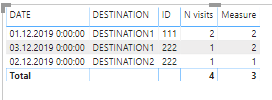
First, create a calculated table
Table 2 =
SUMMARIZE('Table','Table'[DESTINATION],'Table'[DATE],'Table'[ID],"N visits",COUNTROWS('Table'))
or you can do the same in the Power Query Editor mode using Group By functionality
Second, creare a measure in your table
Measure =
CALCULATE(COUNT('Table 2'[ID]),ALLEXCEPT('Table 2','Table 2'[DESTINATION]))
and you will be able to get desired output
Hi @manideep547
it is exactly thread for Desktop https://community.powerbi.com/t5/Desktop/bd-p/power-bi-designer or DAX https://community.powerbi.com/t5/DAX-Commands-and-Tips/bd-p/DAXCommands forums, but try the next technique
First, create a calculated table
Table 2 =
SUMMARIZE('Table','Table'[DESTINATION],'Table'[DATE],'Table'[ID],"N visits",COUNTROWS('Table'))
or you can do the same in the Power Query Editor mode using Group By functionality
Second, creare a measure in your table
Measure =
CALCULATE(COUNT('Table 2'[ID]),ALLEXCEPT('Table 2','Table 2'[DESTINATION]))
and you will be able to get desired output
try here
https://ufile.io/8roxj9tj
Check out the April 2026 Power BI update to learn about new features.
If you have recently started exploring Fabric, we'd love to hear how it's going. Your feedback can help with product improvements.
A new Power BI DataViz World Championship is coming this June! Don't miss out on submitting your entry.
| User | Count |
|---|---|
| 9 | |
| 8 | |
| 8 | |
| 8 | |
| 7 |
| User | Count |
|---|---|
| 37 | |
| 29 | |
| 26 | |
| 19 | |
| 19 |