This is best Fabric, Power BI, SQL and AI community event. How do we know? The last event sold out! Save €200 with code FABCMTY200.
Register nowThe Fabric community is now in read-only for platform upgrade. Learn more
Hi Guys,
We want to split our capacity into Test and Production.
I am wondering if we could move a workspace, dataset, dataflow or report between our capacities?
For example.
We have a dataset and a report in our test capacity. Can we move these two entities to our production capacity?
If not, what are the options?
Export from test and import to production?
Solved! Go to Solution.
Hi @Anonymous ,
You can move workspaces between capacities, please follow these steps:
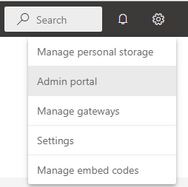
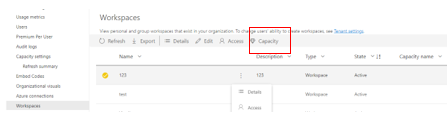
Open the “Admin portal” of service, select “Workspace” and choose the workspace which you want to move.
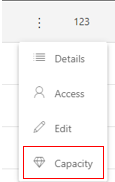
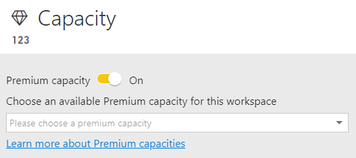
And then you can click “Capacity” icon and choose the target workspace as shown in the following figure.
Best Regards,
Community Support Team _ xiaosun
If this post helps, then please consider Accept it as the solution to help the other members find it more quickly.
Hi @Anonymous ,
You can move workspaces between capacities, please follow these steps:
Open the “Admin portal” of service, select “Workspace” and choose the workspace which you want to move.
And then you can click “Capacity” icon and choose the target workspace as shown in the following figure.
Best Regards,
Community Support Team _ xiaosun
If this post helps, then please consider Accept it as the solution to help the other members find it more quickly.
@Anonymous I believe you do this in Workspace settings, you can choose which capacity the workspace is in.
Join us in Barcelona for FabCon and SQLCon, the Fabric, Power BI, SQL, and AI community event. Save €200 with code FABCMTY200.
| User | Count |
|---|---|
| 15 | |
| 11 | |
| 9 | |
| 8 | |
| 6 |
| User | Count |
|---|---|
| 29 | |
| 23 | |
| 18 | |
| 15 | |
| 13 |