cancel
Showing results for 
Search instead for 
Did you mean: 

The Power BI Data Visualization World Championships is back! Get ahead of the game and start preparing now! Learn more

Reply
Anonymous
Not applicable

Microsoft forms, changing owner

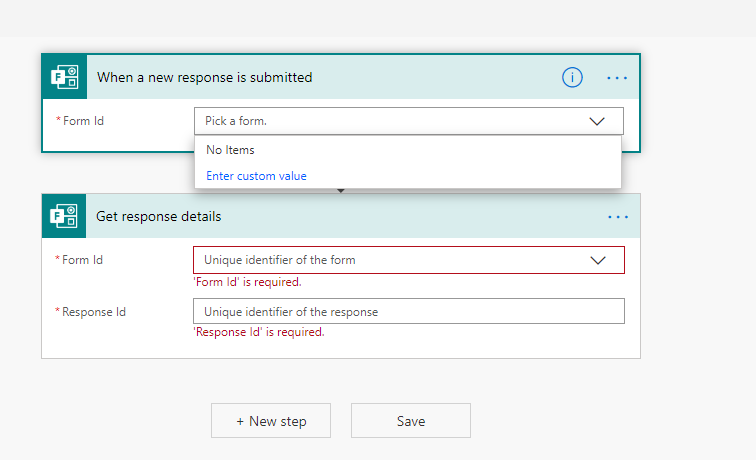
Hello. I need to create flow to connect Microsoft form to pbi data set in online version. But problem is that Form I need to use in the flow in not created using my account but my colleage.  It can find only forms that I have created with my account I tested it. But when I try to select form from the list it cant find it. I attach screenshot. As well to mention forms are shared with me and that doesnt allow to use them in flow. Is there any solution that would allow me to use form in flow from other account?microsoft forms.png

1 ACCEPTED SOLUTION
nickyvv
Most Valuable Professional

Hi @Anonymous, 

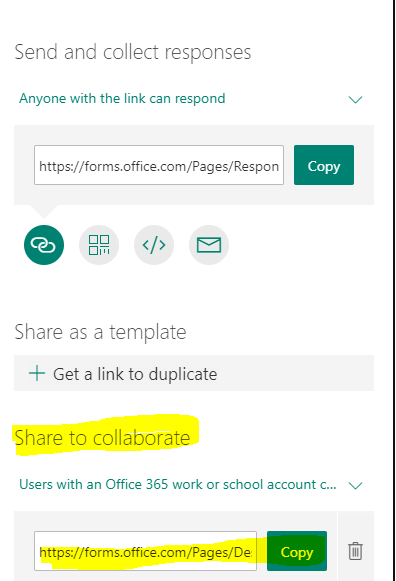
when your colleague shares the Form with you, you can also access it from Flow (now called Power Automate).

image.png

I think what you are looking for is the last option: Share to collaborate.


I recently wrote a blog series about a Form, then getting answers with Power Automate and pushing them into a Power BI streaming dataset. You might be interested in reading those: Part 1  and Part 2.


Did I answer your question? Mark my post as a solution!

Blog: nickyvv.com | @NickyvV


View solution in original post

2 REPLIES 2
v-xuding-msft
Community Support
Community Support

Hi @Anonymous ,

You could try the link of "Share to Collaborate".

1.PNG

Best Regards,

Xue Ding

If this post helps, then please consider Accept it as the solution to help the other members find it more quickly.

Best Regards,
Xue Ding
If this post helps, then please consider Accept it as the solution to help the other members find it more quickly.
nickyvv
Most Valuable Professional

Hi @Anonymous, 

when your colleague shares the Form with you, you can also access it from Flow (now called Power Automate).

image.png

I think what you are looking for is the last option: Share to collaborate.


I recently wrote a blog series about a Form, then getting answers with Power Automate and pushing them into a Power BI streaming dataset. You might be interested in reading those: Part 1  and Part 2.


Did I answer your question? Mark my post as a solution!

Blog: nickyvv.com | @NickyvV


Helpful resources

Announcements
Power BI DataViz World Championships

Power BI Dataviz World Championships

The Power BI Data Visualization World Championships is back! Get ahead of the game and start preparing now!

December 2025 Power BI Update Carousel

Power BI Monthly Update - December 2025

Check out the December 2025 Power BI Holiday Recap!

FabCon Atlanta 2026 carousel

FabCon Atlanta 2026

Join us at FabCon Atlanta, March 16-20, for the ultimate Fabric, Power BI, AI and SQL community-led event. Save $200 with code FABCOMM.