This time we’re going bigger than ever. Fabric, Power BI, SQL, AI and more. We're covering it all. You won't want to miss it.
Learn moreGet Fabric Certified for FREE during AI Skills Fest. This week only. Secure your voucher now.
Hi,
I have a Power BI Embedded license and I have created some dataflows there. I want to use machine learning models on one of them, but I get the message that "Machine Learning models are disabled". I have tried to enable machine learning models, but that option does not exist in my Admin Portal.
Is machine learning models for dataflows only accessible on Power BI Premium?
Hi @Anonymous
AutoML is available for dataflows in workspaces hosted on Power BI Premium and Embeddedcapacities.
Please note:
1. the workspace where you create a dataflow needs to be on your dedicated capacity so that AI preview can be enabled.
2. make sure the dataflow can be refreshed successfully.
You could refer to the article how to create machine learning model step by step.
Best Regards
Maggie
Community Support Team _ Maggie Li
If this post helps, then please consider Accept it as the solution to help the other members find it more quickly.
Hi,
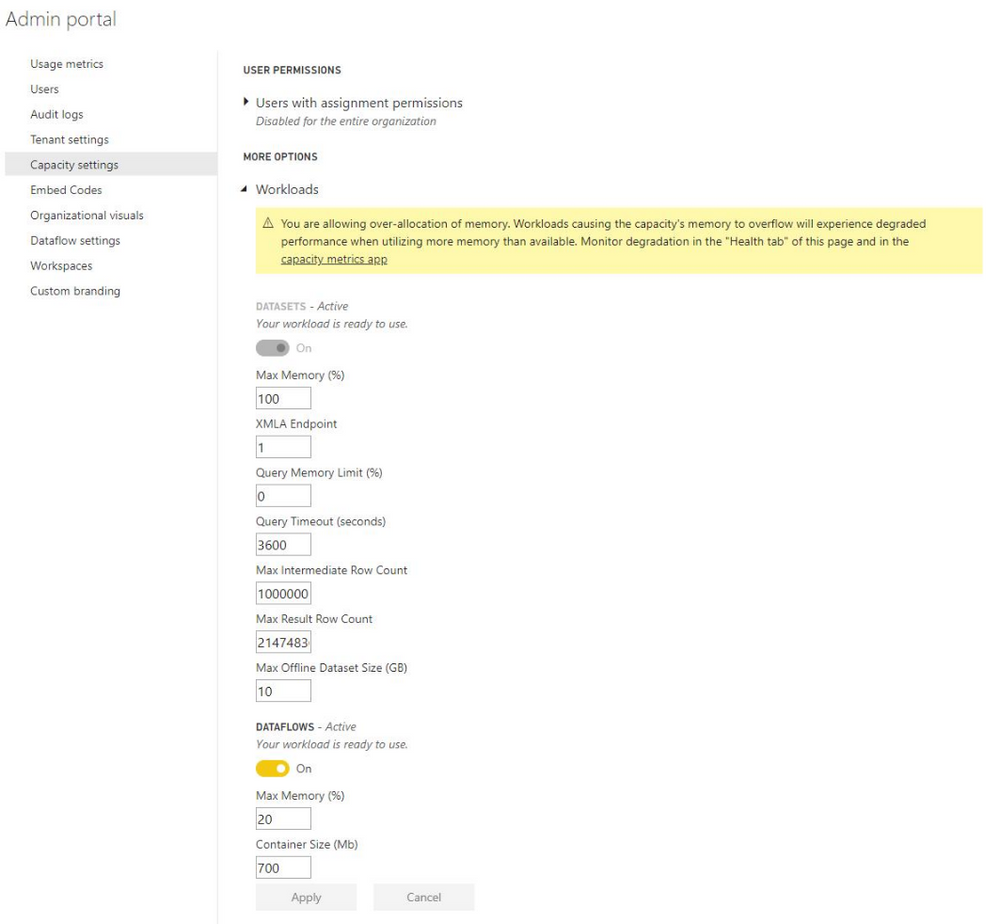
My problem is that the enabling button does not appear in the Power BI Admin portal. Here I am logged on with a global admin user.
You can see that the enable AutoML button does not appear here.
Check out the May 2026 Power BI update to learn about new features.
Sign up to receive a private message when registration opens and key events begin.
If you have recently started exploring Fabric, we'd love to hear how it's going. Your feedback can help with product improvements.
| User | Count |
|---|---|
| 15 | |
| 11 | |
| 9 | |
| 7 | |
| 7 |
| User | Count |
|---|---|
| 43 | |
| 35 | |
| 31 | |
| 23 | |
| 20 |