Don't miss your chance to take the Fabric Data Engineer (DP-600) exam for FREE! Find out how by attending the DP-600 session on April 23rd (pacific time), live or on-demand.
Learn moreNext up in the FabCon + SQLCon recap series: The roadmap for Microsoft SQL and Maximizing Developer experiences in Fabric. All sessions are available on-demand after the live show. Register now
Hello I was wondering if anyone could give me a hand on something. I have a MYSQL database which I've connected to in the desktop totally fine but when I publish it I can't refresh. Can I use a personal gateway to do this and if so how do I add it as a datasource? Is the only alternative installing a gateway on a VM and doing it that way?
Cheers!
Solved! Go to Solution.
Hi. The answer is yes. You must install a Gateway in any VM that can access the MYSQL from there. The best use of the Gateway would be installing the standard or enterprise version. Then you will need the driver or provider to connect to mysql in the Gateway VM like the one you might have installed to use Power Bi Desktop. It's very important to restart the VM in order to help it take the changes.
Once all that is complete you can add the source in the Power Bi Service to enable the schedule refresh. You can follow this guide in the process. The post is only missing the mysql drive installation
https://blog.ladataweb.com.ar/post/189013278236/powerbigateway-configurar-una-actualización
I hope that helps,
Happy to help!
Hi @gmurdoch_85
You can add the datasource in Manage Gateways .Choose the gateway you have created and click add data source .
Enter the Server name and Database name for your data source ,and enter the credentials .
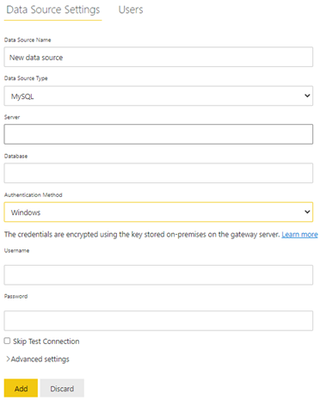
The premise is that you must create a gateway and then add data source in service . And my suggestion is to install the enterprise gateway .
If you don’t know how to configure gateway you can refer to the link :
Install an on-premises data gateway | Microsoft Docs
The differences between personal and standard gateways can refer to this link :
Use personal gateways in Power BI - Power BI | Microsoft Docs
I search in forums and find no documents about data source MySQL, but you can refer to the data source SQL Server .
Manage your data source - SQL - Power BI | Microsoft Docs
Best Regards
Community Support Team _ Ailsa Tao
If this post helps, then please consider Accept it as the solution to help the other members find it more quickly.
Hi @gmurdoch_85
You can add the datasource in Manage Gateways .Choose the gateway you have created and click add data source .
Enter the Server name and Database name for your data source ,and enter the credentials .
The premise is that you must create a gateway and then add data source in service . And my suggestion is to install the enterprise gateway .
If you don’t know how to configure gateway you can refer to the link :
Install an on-premises data gateway | Microsoft Docs
The differences between personal and standard gateways can refer to this link :
Use personal gateways in Power BI - Power BI | Microsoft Docs
I search in forums and find no documents about data source MySQL, but you can refer to the data source SQL Server .
Manage your data source - SQL - Power BI | Microsoft Docs
Best Regards
Community Support Team _ Ailsa Tao
If this post helps, then please consider Accept it as the solution to help the other members find it more quickly.
Hi. The answer is yes. You must install a Gateway in any VM that can access the MYSQL from there. The best use of the Gateway would be installing the standard or enterprise version. Then you will need the driver or provider to connect to mysql in the Gateway VM like the one you might have installed to use Power Bi Desktop. It's very important to restart the VM in order to help it take the changes.
Once all that is complete you can add the source in the Power Bi Service to enable the schedule refresh. You can follow this guide in the process. The post is only missing the mysql drive installation
https://blog.ladataweb.com.ar/post/189013278236/powerbigateway-configurar-una-actualización
I hope that helps,
Happy to help!
If you have recently started exploring Fabric, we'd love to hear how it's going. Your feedback can help with product improvements.
A new Power BI DataViz World Championship is coming this June! Don't miss out on submitting your entry.
Share feedback directly with Fabric product managers, participate in targeted research studies and influence the Fabric roadmap.